Ramadan Kareem Iftar Flyer Pack: Design Inspiration
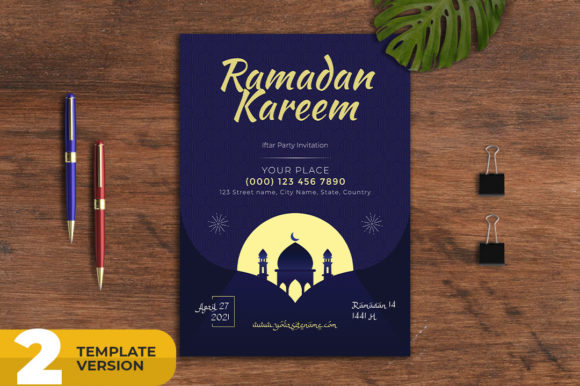
Designing for the holy month of Ramadan requires a balance of reverence, warmth, and visual appeal. Whether you are promoting an Iftar gathering, a school event, or a mosque program, the right template saves time while ensuring professional results. The Ramadan Kareem Iftar Flyer Pack offers a complete solution for creating stylish flyers, posters, and social media banners quickly and easily. This versatile set of templates is built for creators, marketers, and small business owners who need consistent, high-quality visuals without starting from scratch.
This pack is not just a collection of designs—it is a practical toolkit. With fully layered PSD files, print-ready CMYK settings, and a dedicated social media banner at 1080x1080 pixels, it covers both traditional print and digital platforms. The included help file and free font references make customization straightforward, even for those with basic Photoshop experience. Below, we explore how to get the most out of this resource, from creative applications to practical tips for maintaining clarity and consistency.
What Makes the Ramadan Kareem Iftar Flyer Pack Valuable?
At its core, this pack provides a cohesive visual identity for Ramadan-related communications. The templates are designed with a 5mm bleed, A4 paper size, and 300 DPI resolution for print, ensuring that flyers and posters look crisp and professional. The social media banner uses RGB color mode, optimized for screens. This dual-purpose approach means you can produce a magazine advert, a newspaper placement, a promotional poster, and an Instagram post all from the same design system.
The layered PSD structure is key. Each element—text, background, graphics—is separated, so you can edit colors, swap images, or adjust typography without breaking the layout. For instance, if your mosque wants to highlight a special speaker, you can easily replace placeholder text and adjust the headline size. Similarly, a restaurant promoting daily Iftar specials can change the menu details while keeping the elegant Ramadan motif intact.
Another advantage is the inclusion of a help file. This guides users through font installation, color adjustments, and layer management. For freelancers or hobbyists who may not use Photoshop daily, this support reduces the learning curve. The pack also specifies that photos are not included, which gives you the freedom to use your own imagery—whether that is a photo of your community Iftar, a calligraphy piece, or a mosque silhouette.
Creative Applications Across Different Contexts
The beauty of a multipurpose template like this is its adaptability. Below are several scenarios where the Ramadan Kareem Iftar Flyer Pack can be customized to fit specific needs while maintaining a professional, cohesive look.
Mosque and Community Events
Mosques often need to announce Iftar timings, Taraweeh prayers, or special lectures. A flyer that communicates both the schedule and the spiritual tone is essential. Use the template to feature the mosque’s name prominently, add the daily Iftar time, and include a call to action for volunteers. Because the design is print-ready, you can produce a run of A4 flyers to distribute after Jumu’ah or place on community bulletin boards. The consistent branding across weeks helps attendees recognize event materials instantly.
For larger gatherings, such as an Eid celebration, the template can be repurposed as a poster. Adjust the headline from “Iftar Invitation” to “Eid Mubarak Celebration” and update the date, venue, and contact details. The 5mm bleed ensures that printed posters have no white edges, giving a polished finish.
School and Educational Programs
Schools organizing Ramadan activities—like a charity drive, an Iftar for students, or an Islamic arts workshop—can use this pack to create engaging promotional material. Teachers or parent volunteers can edit the flyer in Photoshop, adding the school logo, event details, and a brief description. Because the template is layer-organized, it is easy to replace the background graphic with a school photo or student artwork.
Social media banners are equally important. A 1080x1080 pixel post on the school’s Facebook or Instagram page can announce an upcoming Iftar for parents and students. The RGB color mode ensures the colors appear vibrant on screens. For consistency, use the same color palette and fonts across both the print flyer and the digital banner.
Restaurants and Food Businesses
Restaurants offering Iftar buffets, suhoor specials, or Ramadan catering can use the template to attract customers. The design’s elegant layout works well for menu highlights—list the dishes, pricing, and reservation details. Because the pack is multipurpose, you can create a print flyer for in-store distribution and a matching social media banner for online promotions.
Consider creating a series: one flyer for the first week of Ramadan, another for the last ten days, and a third for Eid. Keep the background consistent but update the content. This builds recognition and saves design time. The free font included in the pack helps maintain a unified typographic style across all materials.
Nonprofit and Charity Campaigns
Charity organizations often ramp up fundraising during Ramadan. A well-designed flyer can communicate the cause, the donation methods, and the impact. Use the template to feature a compelling headline like “Feed a Fasting Family” with a clear call-to-action button. The print-ready version can be handed out at community centers, while the social media banner can be shared in fundraising posts.
The layered PSD allows you to experiment with color schemes. For example, use a deep green or gold color to evoke a traditional Ramadan feel, or choose a clean white-and-blue combination for a modern, trustworthy look. The help file includes guidance on color customization, so even beginners can adjust the palette to match their organization’s branding.
Adapting the Template for Different Platforms and Audiences
Different audiences require different visual approaches. The Ramadan Kareem Iftar Flyer Pack provides a flexible base that you can tailor to various demographics and platforms.
Print Advertising: Magazines and Newspapers
For a magazine advert or a newspaper placement, resolution and color mode are critical. The pack’s 300 DPI and CMYK color space ensure that printed colors are accurate and sharp. When preparing the file for a publication, check the specific size requirements—some magazines may need a different trim size. The A4 layout is a common standard, but you can adjust the canvas size in Photoshop while keeping the design elements intact.
To make the ad stand out, use a focal point like a lantern, crescent, or calligraphy element from the template. Keep text concise: headline, date, venue, and a brief tagline. The template’s organized layers make it simple to hide or show elements as needed. For instance, if a newspaper ad requires more white space, you can reduce the number of graphic elements or move them to the background.
Social Media: Facebook, Instagram, and LinkedIn
Social media banners need to be attention-grabbing in a crowded feed. The included 1080x1080 pixel banner is square, which works well for Instagram posts and Facebook timeline photos. You can also create variations by duplicating the PSD and adjusting the canvas size—for example, a 1080x1920 pixel Story format for Instagram or a 1200x628 pixel banner for LinkedIn events.
When adapting for social media, consider the audience’s behavior. Use bold, readable fonts for headlines because many users browse without sound. The template’s typography is designed for clarity, but you can increase the font size or use a contrasting color for the call-to-action. Add your logo in a corner, and ensure that important text is centered to avoid being cropped by platform image previews.
For a series of posts—like a countdown to Ramadan or daily Iftar tips—keep the background consistent but change the text layer. This creates a recognizable visual series that followers will anticipate. The layered PSD makes swapping text quick; you can even save multiple versions as templates for future use.
Email Newsletters and Digital Flyers
Email marketing during Ramadan can benefit from a cohesive design. Export the flyer as a high-resolution JPEG or PNG and use it as a hero image in your newsletter. Because the pack includes both print and digital color modes, you can easily switch to RGB for email use. Ensure the file size is optimized—around 200–500 KB—so that it loads quickly on mobile devices.
For digital flyers shared via WhatsApp or Telegram, keep the design simple. The template’s layout often includes a clear hierarchy: headline, subhead, details, and call-to-action. This structure works well on small screens. Test the flyer on a phone before distributing to ensure the text is legible without zooming.
Practical Tips for Clear, Effective, and Consistent Designs
Even with a ready-made template, a few best practices can elevate your final output. Here are actionable recommendations to keep your Ramadan designs professional and audience-friendly.
- Use your own images for authenticity. The pack does not include photos, so source royalty-free images or use original photography. A real photo of your community Iftar, a local mosque, or a lantern display adds warmth and authenticity. Ensure the images are high resolution (300 DPI for print, 72 DPI for web) and match the template’s color tone.
- Maintain readable typography. The free fonts included in the pack are chosen for legibility. Avoid adding too many font sizes or styles. Stick to one or two typefaces—one for headlines, one for body text. Use bold or color to emphasize key details like dates and location.
- Keep the layout balanced. The template already has a professional grid. When editing, avoid overcrowding. If you add extra text, consider reducing the font size slightly or increasing the canvas size. White space is your ally—it makes your flyer look clean and focused.
- Test print and digital outputs separately. A design that looks great on screen may print differently. Before printing a large batch, do a test print on your home printer or at a local print shop. Check the colors, bleed, and alignment. For digital banners, preview on a few devices to ensure the colors and text are consistent.
- Create a brand style guide. If you are designing for a mosque, school, or business, note the exact hex codes, font names, and layout rules you used. This makes it easy to produce future materials that match, whether it is a Ramadan flyer next year or a regular event poster.
- Leverage the help file. If you get stuck on color customization or text updating, refer to the included help file. It often contains step-by-step instructions for common tasks. This saves time and reduces errors.
Real-World Examples and Practical Inspiration
To illustrate the pack’s versatility, consider these concrete scenarios:
- Example 1: A local mosque’s weekly Iftar. Use the template with a green and gold color scheme. Replace the placeholder text with “Al-Noor Mosque Weekly Iftar” and list the days, times, and a brief message about community. Print on glossy A4 paper and distribute after Friday prayers. The same design, resized to 1080x1080, is posted on the mosque’s Instagram with a “Tap for Details” call-to-action.
- Example 2: A restaurant’s Ramadan menu promotion. The owner uses the flyer to highlight a special Iftar buffet. The headline reads “Grand Iftar Buffet Every Evening.” Below, list the menu items in two columns. The background uses a warm earthy tone with a lantern silhouette. Printed flyers are placed on tables, and the social media banner is shared on Facebook with a link to reserve a table.
- Example 3: A school’s charity Iftar drive. The PTA team edits the template to include “Student-Led Charity Iftar – Donations Welcome.” They add the school logo and a QR code linking to a donation page. The print flyer is sent home with students, and the digital banner is posted on the school’s parent group. The consistent design builds trust and encourages participation.
- Example 4: A nonprofit’s end-of-Ramadan campaign. The organization creates a series of three banners: one for the last ten days, one for Laylatul Qadr, and one for Eid. Each banner uses the same background but different text layers. The series is posted daily on social media, keeping the branding consistent while the message evolves.
Keeping Your Designs Original and Audience-Focused
While templates provide a great starting point, adding your own creative touch ensures that the final design feels personal and relevant. One way to do this is by customizing the color palette to reflect your brand or event theme. The pack’s layer organization allows you to change the background color, text color, and graphic accents independently.
Another approach is to incorporate local cultural elements. If your community uses specific symbols—like the fanous lantern, dates, or a particular geometric pattern—integrate them into the design. The template’s structure can accommodate additional graphic layers without breaking the layout.
For audiences that prefer simplicity, remove some decorative elements to create a minimal, modern look. For traditional audiences, keep the ornate details and use rich colors like deep red, gold, or navy. The key is to know your audience and let that guide your customization choices.
Finally, always double-check the spelling of names, dates, and verses if you include Quranic or Arabic text. A small error in a public flyer can undermine credibility. The help file may include tips for handling Arabic text in Photoshop, which is useful if you are working with bilingual content.
The Ramadan Kareem Iftar Flyer Pack is more than a set of templates—it is a foundation for meaningful communication during a sacred month. Whether you are a seasoned designer or a volunteer creating materials for the first time, the pack’s professional features and ease of editing empower you to produce results that resonate. By focusing on clarity, consistency, and authenticity, you can create flyers, posters, and banners that not only look stylish but also serve their purpose effectively. For any additional help with color customization or text updating, the support contact through the creator’s profile is a valuable resource. Start with the template, add your vision, and share the spirit of Ramadan with confidence.