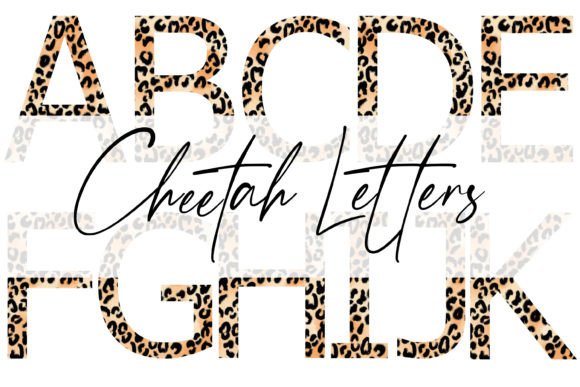
Cheetah Alphabet Sublimation Letters: Precision Graphics for Creative Projects
When you work with digital design or sublimation printing, you quickly learn that not all lettering elements are created equal. Many so-called alphabets are simply digitized fonts—scalable but generic, lacking the texture, depth, and handcrafted feel that sets a project apart. Cheetah Alphabet Sublimation Letters offer something fundamentally different: individually rendered letter emblems designed from the ground up for sublimation and clip art use. Each character stands approximately 8.75 inches tall, with variable widths that introduce natural visual rhythm. This is not a standard font converted into a file. It is a deliberate, crafted graphic asset built for professionals and creators who expect every pixel to serve a purpose.
Understanding what makes these letters distinct—and where they fit into your workflow—can help you decide whether they belong in your next project. Let's walk through the details, from file structure and resolution to real-world applications and practical limitations.
What Sets These Letter Emblems Apart
The most immediate difference you will notice is the size and proportions. Standing at nearly nine inches tall, each letter occupies significant visual real estate. That height is paired with variable width per character, meaning a letter like W or M will have a broader footprint than a narrow letter such as I or l. This variability mimics hand-drawn or custom-crafted typography, where each glyph adjusts to its own form rather than being forced into a uniform bounding box. The result is a more organic, engaging composition when letters are placed side by side.
More importantly, these are not font files. You cannot type with them as you would with a standard typeface. Each letter is a standalone PNG graphic, painstakingly rendered with attention to edge quality, internal detail, and overall consistency. This distinction matters because it gives you complete control over placement, layering, scaling, and effects without relying on system fonts or software rendering engines.
Resolution and Transparency: Built for Sublimation
Every file in this set arrives at 300 DPI. For sublimation printing, that resolution is the industry standard for producing crisp, clean transfers without visible pixelation or blurring. Whether you are pressing onto polyester fabric, coated ceramic, or aluminum panels, 300 DPI ensures that fine details and smooth curves hold their integrity during the heat transfer process.
The transparency background is integrated directly into the PNG. There are no white halos, no jagged matte edges, and no need to manually remove a background before use. You drop the file into your design software, and the letter sits cleanly on your canvas, ready to be positioned, rotated, or combined with other elements. This seamless integration saves time and eliminates the guesswork that often accompanies less carefully prepared graphics.
Where Cheetah Alphabet Sublimation Letters Excel
These letters are not a one-size-fits-all solution, and understanding their strengths helps you apply them where they will have the greatest impact. Here are several scenarios where they naturally outperform standard font-based approaches.
- Large-format sublimation projects. When you are printing onto a tote bag, a pillow cover, or a garment panel, you need lettering that reads clearly at a distance. The 8.75-inch height gives you immediate presence without requiring excessive scaling, which can degrade resolution in font-based systems.
- Custom signage and home décor. Think wooden signs with sublimated graphics, ceramic tiles, or coasters. The variable widths add a handcrafted aesthetic that complements rustic, modern, or eclectic design themes.
- Personalized gifts and promotional items. Whether it is a name, a short phrase, or a monogram, having each letter as an independent PNG lets you space, rotate, or color them individually. This flexibility is hard to achieve with standard text tools.
- Clip art and digital scrapbooking. Because the backgrounds are transparent and the resolution is high, these letters work beautifully in digital compositions, invitations, social media graphics, and print-on-demand listings.
Who Benefits Most from This Format
While the letters are accessible to anyone with basic image editing skills, certain users will find them especially valuable.
- Sublimation printers and crafters. If you operate a heat press and regularly create custom transfers, having pre-rendered, high-resolution letter files eliminates the step of converting fonts to curves or rasterizing text. You save time and reduce the chance of software compatibility issues.
- Graphic designers and illustrators. When you want a handcrafted or bold lettered look without drawing each character from scratch, these emblems serve as a reliable starting point. You can layer textures, apply gradients, or combine them with photographic backgrounds.
- Small business owners and Etsy sellers. Product listings that feature sublimated items often require consistent, professional typography. Using a dedicated graphic alphabet ensures every product photo and listing image maintains the same visual quality.
- Educators and content creators. For creating classroom materials, posters, or digital presentations, having bold, clear lettering that you can resize without quality loss makes preparation faster and results more polished.
Strengths and Practical Considerations
No design resource is perfect for every situation. Knowing the trade-offs helps you use these letters effectively and avoid frustration.
Strengths
- Pixel-perfect clarity. At 300 DPI, even the smallest curves and serif details remain sharp. You can scale the letters down without introducing artifacts, and scaling up is possible within reasonable limits if you maintain the resolution in your software.
- Consistent visual style. Because each letter is individually crafted, the set feels cohesive without being monotonous. The variable widths add character while maintaining a unified aesthetic.
- Transparent backgrounds. No need for manual masking or background removal. This reduces prep time and minimizes errors, especially when working with multiple letters in a single composition.
- Designed for sublimation. The files are specifically optimized for the heat transfer process, meaning color accuracy and edge retention are prioritized during rendering.
Considerations and Limitations
- Not a font. You cannot type directly with these files. Each letter is a separate image, so composing a word requires manual placement. For short phrases or single words, this is manageable. For lengthy text, it becomes impractical.
- Height is fixed at 8.75 inches. This is a design choice that gives you a consistent baseline. If you need letters significantly smaller or larger, you will need to scale them, which may affect resolution if you enlarge beyond the original dimensions.
- Variable widths require careful layout. Because each letter has its own width, spacing between characters may not be uniform. You will need to adjust kerning manually in your software to achieve balanced compositions.
- File format limitation. PNG is excellent for quality and transparency, but it does not support editable text layers. Once placed, the letter is a raster graphic. This is fine for most sublimation and print work, but it limits flexibility for some digital applications.
Real-World Scenario: Building a Custom Gift
Imagine you are creating a sublimated tote bag as a gift for a friend who loves wildlife photography. You want the word SAVANNA in bold, eye-catching letters across the front. Using Cheetah Alphabet Sublimation Letters, you open each letter PNG and arrange them on your canvas. Because the letters have variable widths, the word has a natural rhythm—wider letters like A and V anchor the composition, while narrower letters like S and N allow the eye to move smoothly.
You decide to give each letter a slight color gradient that shifts from warm gold to deep brown, echoing the landscape. The transparent background lets you place the letters directly over a subtle grass texture image without any masking. After arranging the layout, you print onto sublimation paper and press the transfer onto the polyester tote. The result is crisp, vibrant, and has a handcrafted feel that a standard font could not replicate.
This scenario highlights the primary value of these letters: they give you control and visual quality that bridges the gap between standard typography and fully custom illustration.
How to Evaluate Whether These Letters Suit Your Needs
Before purchasing or downloading any graphic alphabet, consider the following questions:
- What is your typical project size? If you consistently work with small text (less than 2 inches), a font may be more efficient. If you work with medium to large lettering (4 inches and above), these PNGs become much more practical.
- How much manual layout work are you willing to do? These letters shine when you enjoy or require hands-on positioning. If you need automated text wrapping or bulk text handling, stick with a font.
- Do you need transparency and resolution for printing? If your output is digital-only or low-resolution, the 300 DPI advantage may not matter. For print, especially sublimation, it is essential.
- Is the visual style aligned with your brand or project? The look of these letters is bold and crafted. Make sure it fits the tone you want—modern, natural, or rustic aesthetics work well; ultra-minimalist or corporate styles may not.
Final Thoughts on Using Graphic Alphabets in Your Workflow
Cheetah Alphabet Sublimation Letters occupy a specific and valuable niche in the world of digital design assets. They are not a replacement for fonts, and they are not intended to be. Instead, they serve as high-quality, ready-to-use graphic elements that excel in sublimation printing, custom gift creation, and any project where standard text feels too mechanical or limited.
The combination of 300 DPI resolution, transparent PNG format, individual letter craftsmanship, and variable proportions gives you a tool that prioritizes visual impact and print fidelity. For sublimation professionals, small business owners, and creative hobbyists who regularly produce large-format or short-text designs, these letters can save time and elevate results. For those working primarily with long-form text or needing automated layout tools, they are likely best used as accent elements rather than primary text.
Understanding what these files offer—and where their limits lie—lets you make an informed decision. When used in the right context, they deliver exactly what they promise: pixel-perfect, sublimation-ready lettering that brings a handcrafted feel to every project you build.