Why a Printer Mascot Logo Vector Is Your Brand’s Best Creative Asset
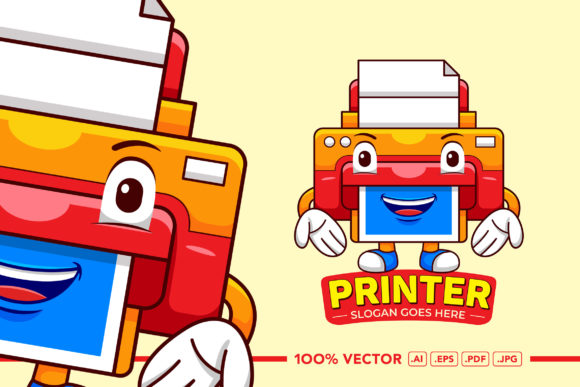
When businesses think about branding, they often picture sleek minimalism or corporate elegance. But there is a quieter, more playful revolution happening in logo design. The Printer Mascot Logo Vector is emerging as a favorite for companies that want to communicate reliability, approachability, and a touch of personality. This artwork, rendered in a flat illustration and cute character style, does more than just represent a business—it creates an emotional connection with the audience. Whether you are launching a print shop, a tech startup, or a creative agency, a mascot built around a printer can turn a mundane machine into a memorable brand ambassador.
The Power of a Mascot in Modern Branding
Mascots have been used for decades to humanize products and services. Think of the Michelin Man or the Pillsbury Doughboy. These characters stick in our minds because they evoke feelings of trust and familiarity. A Printer Mascot Logo Vector does the same thing, but with a modern twist. It takes an everyday office device—something that might seem dry or utilitarian—and transforms it into a friendly, relatable figure. This is especially valuable in industries where customer relationships matter as much as technical expertise.
Flat illustration and cute character styles are particularly effective here. The simplicity of flat design ensures that the logo remains clean and legible at any size, while the cute aesthetic softens the technical nature of printing. A printer mascot can be shown smiling, holding a sheet of paper, or even winking to suggest speed and efficiency. These subtle visual cues communicate warmth without sacrificing professionalism.
Understanding the Vector Advantage
One of the most important qualities of this artwork is that it is vector-based. Unlike raster images that become pixelated when enlarged, vector illustrations maintain crisp edges and smooth curves at any scale. This makes the Printer Mascot Logo Vector fully editable and scalable without losing resolution. For a business, this means one design can serve as a tiny social media avatar, a large storefront sign, or even a billboard graphic without any degradation in quality.
Vectors are also incredibly flexible for editing. You can change colors, adjust proportions, or swap out elements like the printer’s expression or posture. The files come in Ai, EPS, and PDF formats, each catering to different workflows. Adobe Illustrator users will appreciate the native Ai file for seamless layer management. EPS is a universal choice for moving between vector applications. PDF ensures easy sharing and printing. A high-resolution JPG is also included at 5000 x 5000 pixels for quick previews or web use. This range of formats means you are never locked into a single software ecosystem.
Flat Design and Cute Character Style: A Winning Combination
The flat illustration style has dominated branding for the past several years, and for good reason. It emphasizes clarity and color over gradients and shading. When applied to a Printer Mascot Logo Vector, flat design makes the character instantly recognizable. There are no distracting textures or complex shadows to confuse the eye. The result is a logo that works beautifully on screens, packaging, and printed materials alike.
The cute character style adds another layer of appeal. A printer mascot with large eyes, rounded edges, and a cheerful demeanor invites engagement. People are naturally drawn to friendly faces, even when those faces belong to office equipment. This emotional pull can increase brand recall and encourage social sharing. Imagine a printer mascot peeking out from the corner of a website or appearing on a shipping label. It adds a human touch to digital and physical interactions.
Practical Benefits for Business Promotion
Branding is not just about looking good—it is about creating consistency across every customer touchpoint. A Printer Mascot Logo Vector excels in this area because it can be adapted for a wide range of promotional materials. Use it on business cards, letterheads, website headers, email signatures, product packaging, and even merchandise like T-shirts or mugs. The flat design ensures that the logo remains legible whether it is printed small on a pen or large on a banner.
Because the artwork is fully editable, you can customize the mascot to fit different campaigns. For a back-to-school promotion, the printer might wear glasses or hold a textbook. For a holiday sale, you could add a Santa hat. These variations keep your branding fresh while maintaining a consistent core identity. The Printer Mascot Logo Vector is not a static asset—it is a creative toolkit that grows with your business.
Scenarios That Benefit from a Printer Mascot
Different industries can leverage this mascot in unique ways. A local print shop might use the character as the face of their loyalty program. Customers earn points for each ream of paper or cartridge they purchase, and the mascot appears on their receipts and emails. An office supply retailer could place the mascot on shelf talkers or aisle signs to guide shoppers. A tech company that develops printing software might use the mascot in tutorial videos or app icons.
Educational institutions also find value in friendly mascots. A school library or computer lab could use a printer mascot to encourage students to print responsibly or remind them to pick up their documents. The character becomes a gentle authority figure rather than a stern warning. Even event organizers can use the mascot on badges, programs, or digital displays to add a touch of whimsy.
Customization and Editing: What You Need to Know
One detail that often surprises buyers is the font situation. The Printer Mascot Logo Vector package includes fonts as links rather than embedded files. This is standard practice in the design industry to respect licensing agreements. You will find a font links file in the documentation that directs you to the specific website where you can obtain the fonts. Some are free for commercial use, while others may require a license. Always check the terms before using them in your final branding.
Editing the vector files themselves is straightforward if you have basic experience with vector software. Open the Ai or EPS file in Adobe Illustrator, and you will see organized layers for the printer body, face, arms, and background. You can change colors by selecting a shape and applying a new fill. Resizing is as simple as dragging the corners while holding the Shift key to maintain proportions. If you want to modify the character’s expression, you can adjust the curves of the eyes or mouth. The possibilities are extensive, and the documentation provides guidance for beginners.
High Resolution and Print-Ready Quality
With a size of 5000 x 5000 pixels, the included JPG file offers exceptional clarity for digital use. But the real power lies in the vector files, which have no resolution limit. You can output the Printer Mascot Logo Vector at any dimension your project requires. For print, professional offset printing or large-format inkjets demand vector files to ensure sharp results. The PDF and EPS formats are ideal for sending to commercial printers.
This scalability also benefits digital applications. Responsive websites need logos that look sharp on retina displays and small phones alike. A vector mascot adjusts instantly without requiring multiple file versions. You simply export the format you need—SVG, PNG, or JPG—from the original vector master. This saves time and reduces the risk of pixelation errors.
Integrating the Mascot into Your Workflow
Modern branding workflows often involve multiple stakeholders, from designers to marketing managers to printers. A well-organized asset like this makes collaboration smoother. Share the EPS file with a freelance designer for custom animations. Hand the PDF to your print vendor for business cards. Upload the JPG to your social media scheduler for profile updates. Because all files derive from the same vector source, consistency is guaranteed.
The Printer Mascot Logo Vector also plays well with other design elements. Place it alongside geometric shapes for a modern tech look, or pair it with hand-drawn typography for a playful vibe. The flat illustration style is neutral enough to blend with various aesthetics while still holding its own as a focal point.
Observations on Versatility and Longevity
Trends in logo design come and go, but mascots have shown remarkable staying power. A well-designed character can evolve with your brand, adopting new styles or accessories as needed. Because this artwork is vector-based, updating it for future trends does not require starting from scratch. You can replace the flat colors with a duotone palette, simplify the shapes further for a minimalist look, or even add subtle textures for a more tactile feel. The foundation remains solid.
Businesses that invest in a Printer Mascot Logo Vector are not just buying a graphic—they are acquiring a strategic asset. It saves time on future design projects, reinforces brand identity across channels, and creates an emotional bond with customers. For startups and established companies alike, the return on investment becomes evident the moment someone smiles at the logo.
Final Recommendations for Getting Started
Before you begin editing, review the documentation carefully. Locate the font links file and download any typefaces you plan to use. Open the Ai file to explore the layers and see how the character is constructed. Test different color combinations that align with your brand guidelines. Consider how the mascot will look on a dark background versus a light one. Experiment with scaling it down to a favicon size to ensure readability.
The Printer Mascot Logo Vector is ready to serve as the centerpiece of your branding efforts. Whether you are a solo entrepreneur building a print-on-demand shop or a marketing manager refreshing a corporate identity, this artwork offers the flexibility, quality, and charm you need. Happy designing, and happy purchasing.