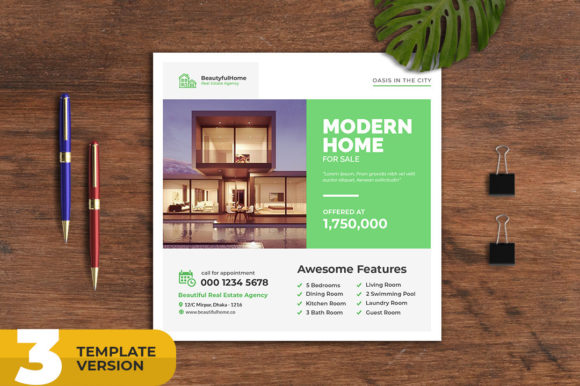
Real Estate Social Media Banner Templates for Agents
If you have ever tried to create social media graphics for a listing while juggling showings, client calls, and paperwork, you know how easy it is to let design fall to the bottom of the list. A Real Estate Social Media Banner template changes that. Instead of starting from a blank canvas every time you need to promote a property, you open a file that already handles the layout, color balance, and visual hierarchy. All you do is swap in your photo and update the text. It sounds simple, but for anyone working in real estate marketing, that kind of efficiency makes a real difference in how consistently you show up online.
The banner template described here is a layered PSD file built at 1080 by 1080 pixels, which happens to be the sweet spot for most social media feeds. It comes in three variations, all at 300 DPI with RGB color. That resolution keeps your images sharp on screens, and the multiple variations give you flexibility without forcing you to redesign from scratch each week. Whether you are advertising a luxury condo, a fixer-upper, or a rental property, you have a foundation that already works.
Visual Characteristics and Overall Appeal
These templates lean toward a clean, modern aesthetic that puts the property front and center. The layouts are designed to guide the viewer’s eye naturally from the image to the headline and then to the call-to-action. There is no clutter, no unnecessary decorative elements that compete with the listing photo. That restraint is actually the hardest thing to achieve when designing from scratch, because it is tempting to add more text, more icons, more effects. A good template protects you from over-designing.
The typography uses free fonts that are easy to install and pair well together. One variation might feature a bold sans-serif headline with a lighter weight for the address and price, while another uses a more elegant serif for a higher-end feel. Having three variations means you can match the tone of the template to the property. A family home in the suburbs might call for a friendly, approachable layout, while a downtown penthouse suits something sleeker and more minimal.
The color schemes are neutral enough to work with almost any property photo, with accents that can be customized. Because the files are fully layered, you can adjust the color of any element without affecting the rest of the design. That level of control is valuable when you need to match your brand colors or create a consistent look across multiple listings.
Where This Template Works Best
The obvious use case is social media. Facebook, Instagram, LinkedIn, and even Pinterest all work well with square 1080x1080 graphics. For a real estate agent, that covers a lot of ground. You can create banners for new listings, open house announcements, price reductions, sold properties, and rental promotions. Each of those scenarios benefits from a consistent visual format because your audience starts to recognize your posts before they even read the caption.
But the template is not limited to social posts. Because it is high resolution and fully editable, you can repurpose the same design for printed flyers, email newsletters, or digital ads. The 300 DPI resolution supports print output cleanly, so if you want to hand out a matching flyer at an open house, you can produce it from the same PSD file. That kind of cross-platform consistency builds trust with potential buyers and sellers. They see the same polished design on your Instagram feed, in their inbox, and on the counter at the property.
Beyond residential listings, the template works well for renovation and interior design projects. If you work with property repair or staging, you can use the banner to showcase before-and-after shots or highlight specific design features. The clean layout lets the images speak, which is exactly what you want when your work is visual. Commercial real estate agents and property negotiators can also adapt the template for office spaces, retail locations, or land parcels. The generic structure handles a wide range of property types without looking out of place.
How Design Influences Readability and Brand Perception
When someone scrolls through their social feed, they decide in a fraction of a second whether to stop or keep going. A banner template that uses proper visual hierarchy gives that decision a nudge in your favor. The headline should be the first thing they read, followed by the price or key detail, and then the address or call-to-action. This template arranges those elements in a logical order so the viewer absorbs the most important information quickly.
Readability also depends on contrast. If you place white text over a bright sky in your listing photo, it will be hard to read, no matter how good the font is. The template layers are designed to include subtle overlays or background shapes that keep text legible regardless of the photo you insert. That is the kind of detail that separates a professional-looking post from something that feels rushed.
Consistency in your social media graphics also reinforces your brand identity. When every banner uses the same typography, similar layout structure, and your logo in the same position, followers start to associate that look with you. Over time, that recognition translates into trust. A seller scrolling past your post might not remember every detail, but they remember that your graphics always look clean and professional. That perception matters when they are choosing an agent to list their home.
Using a template does not mean your brand looks generic. The customization options let you inject your personality through color choices, photo selection, and copywriting. The template provides the structure; your content provides the character. That balance between consistency and flexibility is exactly what you need for long-term social media marketing.
Practical Guidance for Choosing and Using the Template
Before you open the PSD file, take a few minutes to think about the property you are promoting and the audience you want to reach. A template variation with a bold, modern sans-serif font works well for urban condos and younger buyers. A variation with a more classic serif style suits historic homes or luxury estates. Matching the template personality to the property personality makes the final graphic feel intentional rather than random.
Test the template with a few different photos before you commit to a favorite variation. Some photos are horizontal and may need cropping to fit the square format. Others are vertical and work naturally. The template’s smart object layers make it easy to swap images in and out, so you can experiment without rebuilding the file. Find a photo that has a clear focal point and enough negative space to keep the text readable. Avoid photos with too much detail or busy patterns behind the headline area.
When it comes to font pairing, stick with two typefaces at most. Use one for the headline and another for the body text or price. Too many fonts create visual noise and weaken the hierarchy. The template uses free fonts that are well-matched, but if you want to substitute your own brand fonts, you can do that easily because the layers are organized and labeled. Just make sure the replacement fonts have similar proportions and weight so the layout does not break.
Readability should guide every design decision. If the address is small and hard to read on a phone screen, increase the font size or add a background box behind the text. Preview your banner on a mobile device before you publish. What looks balanced on a desktop monitor can feel cramped on a 6-inch screen. The 1080x1080 canvas is generous enough to include all your details without crowding, but you still need to test how it renders in different platforms.
Licensing is straightforward with this template because the fonts included are free for commercial use. That means you can use them in your marketing materials without worrying about licensing fees or restrictions. Always double-check the terms of any font you download separately, especially if you plan to use the banner in paid advertising or printed materials. Some free fonts have limitations on commercial use, and the last thing you want is a copyright issue over a typeface.
Realistic Examples and Design Observations
Imagine you have a new listing in a suburban neighborhood. The house is a three-bedroom with a large backyard and a recent kitchen renovation. You open the template and choose the variation with a friendly sans-serif font and a soft color accent. You drop in a photo of the kitchen, which is bright and has clean lines. The headline reads “Just Listed: 3 Bed, 2 Bath in Oakwood” in bold letters across the top. Below it, the price appears in a smaller weight. At the bottom, the address and your brokerage logo sit neatly. The whole thing takes you ten minutes, and the result looks like a professional designer made it.
Now consider a different scenario. You are running an open house for a downtown loft. The property is edgy, with exposed brick and high ceilings. For this one, you pick the variation with a sleek serif font and a dark background accent. The photo shows the living area with floor-to-ceiling windows. The headline is minimalist: “Open House: Sunday 1-4 PM.” The contrast between the dark background and the bright photo creates a dramatic effect that matches the loft’s personality. The same template, different variation, completely different feel.
One observation I have made after working with many real estate templates is that agents often underestimate the power of negative space. They want to include every feature of the property in the graphic, so they cram in bullet points, icons, and extra text. But a banner that tries to say everything ends up saying nothing. The best banners highlight one or two key selling points and let the photo do the rest of the work. This template encourages that restraint because the layout does not give you room to add a dozen details. That is actually a feature, not a limitation.
If you need help with color customization or text updates, the included help file walks you through the process step by step. Even if you are not a Photoshop expert, you can follow the instructions to change colors, replace images, and adjust typography. The smart object layers are labeled clearly, so you know exactly which layer to edit. The learning curve is shallow, which is important when you need to produce graphics regularly without dedicating hours to design.
Photos are not included in the download file, so you will need to use your own property images. That is actually a good thing because your listings are unique, and the template should showcase them, not stock photography. The quality of your final banner depends heavily on the quality of your photos. Well-lit, properly composed images will make the template shine. Dark or blurry photos will undermine even the best layout. Invest in decent photography, and the template will amplify the result.
For agents and brokers who want to maintain a consistent presence across multiple social platforms, having three variations of the same template is a practical advantage. You can alternate between them for different listings while keeping the overall look cohesive. Followers see variety without confusion, and your feed does not become repetitive. That balance between consistency and freshness is hard to achieve with custom design, but a good template set makes it manageable.
Bringing It All Together
A Real Estate Social Media Banner Template is not a shortcut to good design, it is a foundation that lets you focus on what matters most: the property and the message. When you remove the friction of starting from scratch, you are more likely to post consistently. When you post consistently, your audience grows and your brand strengthens. That is the real value of a well-made template.
Whether you are a seasoned agent, a newer realtor building your presence, or a property agency managing multiple listings, this template gives you a reliable way to produce professional-looking social media graphics without hiring a designer. The fully layered PSD files, the three variations, the high resolution, and the easy editing process all work together to streamline your workflow. If you have been relying on random graphics or skipping social promotion because it felt like too much effort, this template offers a practical way forward.
Try it with your next listing. Swap in your photo, update the text, and see how it feels to have a polished banner ready in minutes. The efficiency alone might change how you approach your entire social media strategy.