Travel Instagram Story Template Design Guide
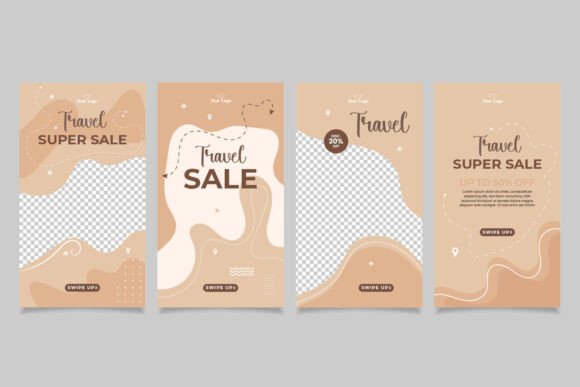
A travel Instagram story template is a pre-designed layout file that helps you create polished, visually consistent stories for your travel content. These templates come as fully editable files, typically in Adobe Illustrator EPS 10 format, with dimensions set to the standard Instagram story size of 1080 by 1920 pixels. The design elements — including text placeholders, color overlays, graphic accents, and spacing — are pre-arranged so you can focus on adding your own photos and captions. Since images are not included, every visual you use will be your own, which keeps your stories authentic and personal.
For anyone posting travel content on Instagram, these templates offer a balance between creative control and time savings. You get a professional layout without starting from a blank canvas. The RGB color mode ensures your stories display accurately on screens, and the included fonts are free to use, so you do not need to worry about licensing issues. The template is organized into labeled layers and groups, making it easy to swap out images, adjust colors, or reposition text without breaking the design.
Whether you are a beginner exploring Instagram for the first time or an experienced designer managing multiple accounts, understanding how this type of template works — and what it can and cannot do — helps you decide if it fits your workflow.
Why Different Audiences Care About Travel Story Templates
A travel Instagram story template is not a one-size-fits-all solution. The value it provides depends on your background, your goals, and the type of content you create. Here is how different people might approach it.
Beginners and Hobbyists
If you are new to Instagram or design, a template removes the guesswork. You do not need to worry about correct dimensions, color harmony, or layout balance. Everything is already set up. You simply open the file in Illustrator, place your travel photo into the marked area, and type your caption into the text box. The template keeps your story looking clean and intentional, even if you have zero design experience.
For hobbyists who enjoy documenting weekend trips or local outings, the template helps you build a consistent visual style without spending hours learning design software. The organized layers let you experiment with different color themes or font sizes by editing once and applying the same changes across multiple stories. Over time, your followers begin to recognize your style, which makes your content more memorable.
Content Creators and Bloggers
If you create travel content regularly, efficiency matters. A structured template lets you produce stories faster because you are not rebuilding layouts from scratch each time. You can create a series of stories — such as a destination overview, food highlights, and a packing list — using the same template with different photos and text. This consistency builds a cohesive feed and helps your audience follow along easily.
Creators often need to balance speed with quality. The template provides a strong starting point, but you can also customize it to match your brand. Change the accent colors, swap out graphic elements, or adjust the font pairing to align with your website or other social channels. Because the file is fully editable, you are not locked into a look you outgrow.
Small Business Owners and Entrepreneurs
For travel agents, tour operators, or hospitality businesses, a travel Instagram story template serves as a marketing asset. You can use it to promote destinations, share client testimonials, or announce special offers. The professional layout conveys reliability and attention to detail — qualities that matter when potential customers are deciding which service to trust.
Business owners often need to produce content quickly without hiring a designer. The template helps you maintain a polished appearance across your social media presence. Since the file is well organized, you can train an intern or assistant to use it without extensive design knowledge. This makes scaling your content production more manageable.
Educators and Freelancers
Teachers and workshop leaders can use a travel story template as a teaching tool. It demonstrates layout principles, layer management, and color theory in a practical context. Students can open the file, see how each element is constructed, and practice making their own edits. This hands-on approach is often more effective than starting with a blank document.
Freelance social media managers may work with multiple clients in the travel niche. A reliable template gives you a repeatable framework that you can adapt per client by changing color schemes, fonts, and imagery. This saves time during client onboarding and ensures each account maintains its own visual identity.
Key Evaluation Criteria for Different Users
When deciding whether this type of template meets your needs, several factors come into play. Your priorities will shift depending on your role and experience level.
Ease of Use and Learning Curve
For beginners, the main concern is whether the template is truly easy to edit. A well-organized file with clearly named layers and groups reduces frustration. Look for templates that label each element — such as “photo placeholder,” “heading text,” and “accent shape” — so you know exactly what to change. The best templates also include a brief instruction file or a readme with basic steps.
Experienced users may prioritize speed over hand-holding. They want a template that opens cleanly, follows standard naming conventions, and does not contain unnecessary locked layers or hidden elements. A template that is “well organized easy to edit” means you can complete a story post in under ten minutes once you are familiar with the layout.
Flexibility and Customization
Some users need a template that looks professional right out of the box. Others want to heavily modify it to match a unique brand. The fully editable nature of an Illustrator EPS 10 file gives you freedom to change almost anything. You can adjust the gradient overlays, replace the graphic icons, or even repurpose the layout for non-travel content such as event announcements or product launches.
One limitation to note: the template is designed for Instagram story dimensions. If you plan to use the same design for other platforms like Facebook stories or YouTube shorts, you will need to adjust the aspect ratio. The layers and objects remain editable, so resizing is possible, but it may require some extra steps in Illustrator.
Quality and Visual Appeal
The template’s creative layout determines whether your final story looks polished or generic. A good travel template uses typography, spacing, and color blocks that draw the eye to your image rather than competing with it. Since images are not included in the download, the quality of your final story depends heavily on the photos you choose. The template provides the structure, but your content fills it with personality.
For professionals, the template must pass a higher bar. The fonts should be clean and readable on mobile screens. The color palette should work with a variety of travel photos — landscape shots, portraits, food close-ups — without clashing. Testing the template with a few of your own images before committing to a full series is a good practice.
Long-Term Usefulness
A template that you use once and discard offers limited value. Consider whether the design can be adapted for different story types: destination highlights, day trips, travel tips, or promotional posts. A layout that works for multiple contexts gives you more return on your investment. Since the file is in Illustrator EPS 10 format, it is compatible with current versions of Adobe Illustrator and likely with future versions as well, which supports long-term use.
For users who produce seasonal or yearly content, the template can serve as a base that you refresh with new color trends or updated fonts. The fonts included are free, so you can legally use them in commercial projects without additional fees. This matters for business owners and freelancers who need to avoid licensing complications.
Practical Examples for Different Reader Types
If you are a travel blogger planning a series on Southeast Asia, open the template in Illustrator, replace the placeholder with a photo of a night market, and adjust the caption text to share a local food tip. The template’s layout keeps the text readable against the busy background. For the next story, you simply swap the image and update the text while keeping the same color scheme. Your audience sees a cohesive series rather than disjointed posts.
For a tour operator promoting a group hike, the template can display the date, location, and a short testimonial from a past participant. Use the accent color to highlight the call-to-action text, such as “Book your spot.” The professional layout helps build trust with potential customers who may be visiting your account for the first time.
If you are a photographer who rarely writes captions, the template gives you space to let the image lead. Keep the text minimal — just the location name and a simple emoji — and let the layout frame your photo cleanly. The template does not force you to fill every text box, so you can adapt it to your personal style.
Educators might use the template as a classroom exercise. Ask students to modify the color palette to match a specific destination or to create a story sequence that tells a narrative. The organized layers make it easy for students to understand how a design is built and to experiment without fear of breaking the original file.
Does This Template Match Your Goals?
When evaluating a travel Instagram story template, start with your own workflow. If you use Adobe Illustrator regularly and want a file that gives you full control over every pixel, this template suits you well. If you prefer drag-and-drop tools or work exclusively on mobile, you may need a different format or a simpler editing app that supports EPS imports.
Consider your content volume. If you post stories a few times a month, a single well-designed template can serve you for a long time. If you post daily, you might need a few variations to keep your feed from feeling repetitive. The template’s easy editability helps in both scenarios, but your needs will determine how many layouts you eventually want.
For commercial users, check that the template allows derivative use for client work. Since the download includes fonts free for use and a fully editable Illustrator file, most commercial projects are covered. However, if you plan to resell the template itself or distribute the original file, that would typically require a separate license. Always review the terms provided with your specific download.
The template is most effective when your travel photos are strong on their own. The layout enhances rather than rescues your visuals. If you are still building your photography skills, the template gives you a clean canvas to practice. As your images improve, the same template can grow with you — simply change the photo and the layout still works.
Making the Most of a Fully Editable Template
To get the best results, take time to explore the file structure before you start editing. Open the template in Illustrator, expand the layers panel, and click through each group. Understand how the design is built. This familiarity will save you time later when you need to make quick edits.
Experiment with the RGB color mode by creating a few color variations. Save each as a separate version — one with warm tones for beach destinations, one with cool greens for mountain trips, and one with neutral shades for urban exploration. This prep work makes future story creation almost automatic.
Since images are not included, curate your photos with the template layout in mind. Choose images where the main subject is not heavily cropped by the placeholder frame. If the template uses a circular or angled cutout, test your photo inside it to ensure the composition still works. Adjusting the photo position inside the frame is straightforward because the template is well organized.
For users who share stories across multiple platforms, you can repurpose the template for other vertical formats by duplicating the file and adjusting the artboard size. The layers remain intact, so you preserve your design work while adapting to new dimensions.
Ultimately, a travel Instagram story template is a tool that saves time, enforces consistency, and gives you a professional starting point. Whether you are a beginner posting your first travel story or a business owner building a brand, the template adapts to your skill level and your content. The key is to treat it as a foundation — one that you can customize, reuse, and eventually build upon as your visual storytelling evolves.