Glonira – Google Slide Template
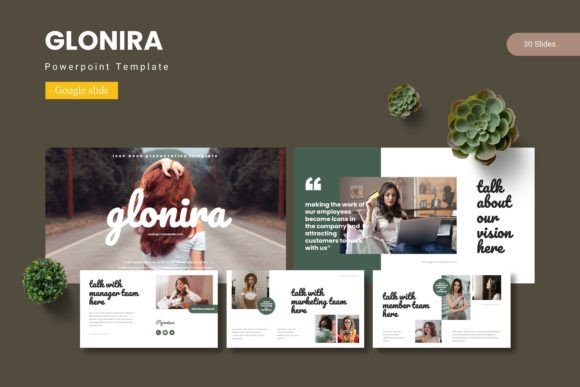
Slides are no longer just containers for bullet points—they are a canvas for visual storytelling, and the right template can transform a routine update into a compelling brand experience. In the fast-paced world of graphic design and digital marketing, the tools you use to communicate ideas are just as important as the ideas themselves. The Glonira – Google Slide Template steps in as a versatile creative asset, offering 150 total slides across 5 premade colors, designed to bridge the gap between polished modern aesthetics and a functional design workflow.
Whether you are crafting a professional presentation for a client pitch or building a comprehensive brand identity deck, this template system prioritizes visual hierarchy and usability. It doesn't just provide a pretty backdrop; it gives you a structured framework for effective visual communication. For designers, this means less time wrestling with layout grids and more time refining the narrative.
Built for Efficiency and Brand Consistency
What sets a high-quality template apart from the rest is its attention to structural integrity. The Glonira collection is built on master slides, which means any global change you make—whether it is a font swap for better typography or a color palette adjustment—propagates seamlessly across your entire deck. This is invaluable for maintaining brand identity without manually editing every single slide.
For creative teams and business owners alike, this translates directly into a more efficient design workflow. You are no longer bogged down by repetitive tasks. Instead, you can focus on the strategic elements of your message. The inclusion of handcrafted infographics, pixel-perfect illustrations, and gallery portfolio slides makes it suitable for a wide range of applications, from annual reports and marketing materials to web design mockups and social media graphics.
The Role of Typography and Color in Visual Design
Color psychology and typography are the cornerstones of effective visual design. Glonira doesn't just throw trends together randomly; it provides 5 distinct color variations, allowing you to align the presentation with your specific brand guidelines or desired mood. Whether you need the seriousness of a dark palette for a UX design proposal or the vibrancy of a bright scheme for creative assets, the flexibility is built into the core files.
The slide layouts are meticulously crafted to maintain readability and contrast, ensuring your message is not lost in the decoration. Every text box and image placeholder follows a logical composition, helping you establish a clear visual hierarchy that guides your audience's eye naturally from one point to the next. This is crucial for anyone working in UI design, editorial design, or print design, where clarity is king.
Practical Applications Across Creative Disciplines
The true test of any creative resource is its adaptability across different mediums. Glonira excels here, serving as more than just a presentation tool. Its section break slides, portfolio layouts, and drag-and-drop picture placeholders make it an ideal starting point for:
- Branding & Logo Design: Showcase your design process, mood boards, and final identity systems cohesively.
- Digital Marketing: Develop consistent social media content, ad campaign lookbooks, or client performance reports.
- Editorial & Packaging Design: Adapt the clean grids and typographic treatments for media kits or product proposals.
- Web & UI/UX Design: Present wireframes, sitemaps, or app concepts within a professional, client-ready framework.
- Merchandise & Advertising Campaigns: Create mood boards that communicate complex creative concepts instantly.
This flexibility positions it as a core asset in any designer's toolkit, streamlining the transition from concept to final delivery.
Selecting the Right Assets for Your Workflow
When evaluating design assets for your next creative project, look beyond surface-level aesthetics. Consider the scalability of the graphics and the logic of the slide hierarchy. Glonira's structure allows you to maintain consistency effortlessly. Start by identifying your primary brand colors and matching them to one of the included color schemes. Use the section break slides to structure your narrative logically, and leverage the infographic slides to turn complex data into digestible visual stories.
Remember, the goal of using a template is not to restrict your creativity but to accelerate your design workflow. By handling the heavy lifting of layout, composition, and grid systems, Glonira frees you up to focus on the finer details—copywriting, custom photography, and unique graphic interventions that elevate the project from good to exceptional.
Key Features That Enhance Usability
- Premade Color Variations: 5 distinct color schemes to match your branding needs.
- Master Slide Logic: Global edits for fonts and colors ensure rapid customization.
- Drag-and-Drop Placeholders: Quickly swap images without distorting the layout.
- Handcrafted Infographics: Pre-built data visualizations that save hours of manual work.
- Section Break Slides: Maintain audience engagement with clear visual separators.
In an era where attention spans are short and first impressions are often digital, the quality of your presentation speaks volumes about your brand's professionalism. Thoughtful design choices—bolstered by reliable creative assets like Glonira—ensure that your visual communication is not just seen, but remembered. Whether you are a seasoned graphic designer or a business owner looking to elevate your brand, investing in a solid template infrastructure is a strategic move toward clearer, more impactful storytelling and a stronger brand identity.