Lamori – A PowerPoint Template Built for Clear Communication
If you have ever stared at a blank slide wondering how to turn raw data into something people actually remember, you already know the value of a presentation template that does more than just look pretty. The Lamori - Powerpoint Template is designed to bridge that gap between information overload and visual clarity. It gives you a framework where content, graphics, and data sit together naturally, so you spend less time fiddling with alignment and more time refining your message. Whether you are pitching to a client, presenting quarterly results, or leading a workshop, this template offers what most generic decks lack: structure that actually supports your story.
What Makes Lamori Stand Out Visually
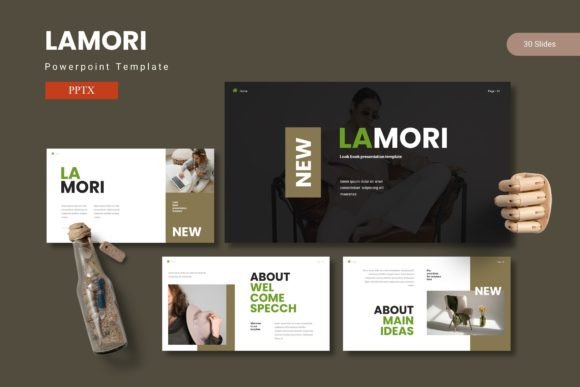
At first glance, Lamori feels polished without being stiff. The design language leans toward modern typography, with clean lines and plenty of breathing room around each element. The template includes 150 total slides spread across 5 premade color variations, which means you are not locked into one look. Each color scheme carries its own personality—some feel more corporate, others lean creative—so you can match the tone to your audience without rebuilding slides from scratch.
The handcrafted infographics are worth calling out. Instead of forcing your data into generic chart templates, Lamori gives you infographic layouts that actually guide the eye. These are built on master slides, so any change you make ripples through the deck consistently. The pixel-perfect illustrations and resizable graphics mean you can scale elements up for a keynote or shrink them down for a handout without losing quality. Picture placeholders support drag-and-drop, which saves time when you are swapping images in and out during the final editing pass.
Section break slides are included as well, which is a small detail that makes a big difference in longer presentations. They give your audience a mental reset before you move to the next topic, and they add a layer of professionalism that separates a good deck from a great one. The portfolio and gallery slides are particularly useful if you are a designer, photographer, or creative professional who needs to showcase work without cluttering the narrative.
Where Lamori Works Best Across Projects
Because Lamori offers 30 slides per color variation—and five color schemes total—it adapts well to different contexts. For entrepreneurs pitching to investors, the clean serif and sans serif font pairings within the template help establish credibility. The slide layouts prioritize data visualization without turning the deck into a spreadsheet. You can place key metrics front and center, support them with brief text, and let the infographics do the heavy lifting.
Marketers will find the template useful for social media graphics, campaign recaps, and strategy presentations. The drag-and-drop picture placeholders make it easy to swap in brand assets or campaign visuals. Since every graphic is resizable and editable, you can pull a single slide element—like an icon or data point—and reuse it in a separate document without starting over. This flexibility matters when you are producing multiple assets from one core presentation.
For bloggers and content creators, Lamori works well for editorial design and web design mockups. You can use the gallery slides to plan out visual content or present a content calendar to collaborators. The template also fits packaging design presentations, where you need to show product concepts alongside market data. The section break slides give you natural stopping points to switch between categories, which keeps the presentation from feeling like a wall of information.
Publishers and small business owners who produce internal reports or client deliverables will appreciate how Lamori handles consistency. Because the design assets are tied to master slides, you can maintain a uniform look across a multi-presenter deck. That consistency matters when you are trying to build brand identity within a team or across multiple projects. A template that enforces visual hierarchy without micromanaging your layout is rare, and Lamori strikes that balance well.
How Lamori Shapes Audience Perception and Engagement
The way a presentation looks directly influences how its content is received. A cluttered slide or a mismatched font pair can undermine even the strongest data. Lamori avoids that by giving you a visual hierarchy that feels intuitive. The title slides draw attention without shouting, the body slides keep text legible, and the infographic slides let numbers breathe. This structure helps your audience absorb information in chunks rather than trying to parse a dense paragraph while also looking at a chart.
From a brand perception standpoint, using a template like Lamori signals that you value both substance and presentation. When you show up with a well-designed deck, your audience is more likely to trust the information you are presenting. That does not mean the template itself sells your idea—it means you remove one more barrier between your message and your listener. The color variations also let you align the deck with your existing brand identity without forcing a square peg into a round hole. If your brand uses cooler tones, the appropriate color scheme will reinforce that identity rather than fight it.
Readability is another area where Lamori earns its keep. The template avoids the common trap of tiny text crammed into oversized graphics. Instead, it prioritizes clear typography and generous spacing. This matters whether you are presenting in a brightly lit conference room or a dimly lit webinar setting. When your audience can actually read your slides without squinting, they stay engaged longer. And when they are engaged, they are more likely to absorb your key points and act on them.
Professionalism also extends to how the template handles transitions. Section breaks, clear headers, and consistent spacing across slides create a rhythm that guides viewers through the narrative. You do not need to be a designer to achieve that effect—Lamori builds it into the structure. That is especially valuable for presenters who are not design-savvy but still want to deliver a polished experience.
Practical Tips for Choosing and Using Lamori
Before you commit to any template, it helps to evaluate how well it fits your specific project. With Lamori, start by reviewing the five color schemes in the folder. Think about your audience and the context. A dark, bold palette might work for a product launch, while a lighter, more neutral scheme could be better for a formal board meeting. The folder contains PowerPoint files for each variation, plus a Readme file with font and photo information. Take a few minutes to read that—it explains any dependencies and helps you avoid last-minute formatting issues.
When testing font pairings, look at how the serif and sans serif options work together in the sample slides. If you plan to replace them with your own brand fonts, test a few slides first to make sure the spacing and hierarchy hold up. Lamori is built on master slides, so any font change you make should propagate through the entire deck. That said, always check a few key slides—especially section breaks and infographics—to confirm nothing shifted unexpectedly.
Consider the commercial licensing as well. If you are using the template for client work or any project that generates revenue, make sure you understand what is covered. The template itself is a design asset, and the included fonts may have their own licensing terms. The Readme file should clarify this, but if you are ever unsure, reaching out to the creator is a safe move. Knowing your licensing upfront saves you from headaches later, especially if you produce a deck for a client and they want to repurpose it internally.
If you are a small business owner or solopreneur, commit to one color scheme for your initial deck and resist the urge to mix elements from multiple variations. The consistency will strengthen your brand identity. Once you have built a presentation you are happy with, you can always create a secondary version in another color for a different audience. The template supports that without requiring you to rebuild the structure.
For designers and creative professionals, Lamori can serve as a starting point that you then customize further. The handcrafted infographics are detailed enough to use as-is, but you can also adjust colors, swap in custom icons, or modify the layout to match a specific brand guideline. The pixel-perfect illustrations give you a foundation that does not fall apart when you start tweaking elements. That is the hallmark of a well-built template—it flexes without breaking.
Final Thoughts on Lamori's Real-World Value
Lamori is not trying to reinvent the wheel. It is a practical, well-structured PowerPoint template that prioritizes clarity and consistency. The 150 slides across 5 colors give you room to adapt without starting from zero each time. The infographics are genuinely useful, the section breaks add polish, and the drag-and-drop placeholders save time during production. Whether you are a marketer building a campaign deck, an entrepreneur pitching to funders, or a publisher organizing an editorial overview, this template gives you a reliable framework. The best presentations do not just look good—they communicate clearly. Lamori helps you do exactly that.