Mastering Visual Communication with the Pucire PowerPoint Template
Presenting ideas in a way that captures attention and conveys information clearly has become an essential skill across nearly every field. Whether you are pitching a business concept, teaching a complex topic, or sharing research findings, the visual quality of your slides can determine how your message is received. The Pucire - Powerpoint Template offers a comprehensive solution for anyone who wants to create polished, data-rich presentations without spending hours on design. This article explores how this template works, what makes it stand out, and how different users can leverage its features to communicate with impact.
Why Presentation Design Matters More Than Ever
Audiences today are accustomed to high-quality visuals. A cluttered or poorly designed slide deck can undermine even the most compelling content. On the other hand, a well-structured presentation that balances data, graphics, and text helps listeners focus on key points and retain information longer. The Pucire - Powerpoint Template is built to address this need by providing a unified design system that saves time while ensuring professional results. Its structure encourages presenters to think about how each slide supports the overall narrative, rather than getting lost in formatting details.
Many professionals struggle with consistency across slides. Changing fonts, mismatched colors, and varying image placements distract the audience. This template eliminates those problems by offering a cohesive set of layouts that work together seamlessly. When every slide follows the same design logic, the audience can concentrate on the message instead of the medium.
Core Features That Define Pucire
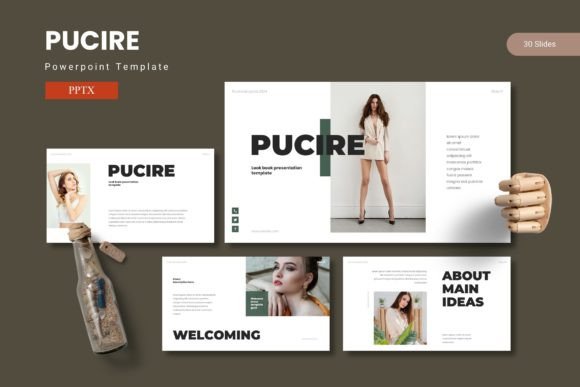
The Pucire - Powerpoint Template includes 150 total slides organized into five premade color variations, with 30 slides per template section. This structure means you can choose a color scheme that aligns with your brand or mood and then build your entire presentation without needing to create slides from scratch. The five color sets provide flexibility for different contexts—corporate presentations, creative pitches, academic lectures, or personal projects.
One of the standout elements is the inclusion of section break slides. These act as visual dividers between major parts of your presentation, giving the audience a moment to process information before moving to a new topic. Section breaks are often overlooked in custom-built decks, but they significantly improve the flow and pacing of a presentation.
Handcrafted Infographics Based on Master Slides
Data visualization is a powerful way to communicate statistics, comparisons, and trends. The Pucire - Powerpoint Template features handcrafted infographics that are built on master slides. This means you can edit the data directly without breaking the design. Instead of manually adjusting charts and icons, you simply replace placeholder values, and the infographic updates automatically. For business owners and researchers who deal with numbers regularly, this feature saves hours of repetitive work.
Infographics in this template include bar charts, pie charts, flow diagrams, timelines, and comparison tables. Each graphic is pixel-perfect and resizable, so you can adjust them to fit your content without losing quality. The illustrations are fully editable, allowing you to change colors, swap icons, or rearrange elements as needed.
Picture Placeholder and Drag-and-Drop Gallery
Adding images to a presentation can be tedious if you have to resize and crop each one individually. The Pucire - Powerpoint Template includes picture placeholders that let you drag and drop images directly into the designated area. The template automatically adjusts the image to fit the frame, maintaining aspect ratio and alignment. This feature is especially useful for photographers, designers, and educators who need to showcase multiple images in a gallery or portfolio slide.
Gallery and portfolio slides are included as part of the 30-slide set, making it easy to present collections of work, product photos, or visual examples. These slides are designed to display images in a clean grid or carousel layout, so the visuals remain the focus without distracting backgrounds.
Practical Applications for Different Users
The versatility of the Pucire - Powerpoint Template makes it suitable for a wide range of scenarios. Here are some examples of how different professionals can benefit from its features:
Business Owners and Entrepreneurs
When pitching to investors or presenting quarterly results, credibility and clarity are paramount. Business owners can use the data-centric slides to present revenue figures, market analysis, and growth projections. The five color variations allow them to match the template to their brand identity, creating a consistent look across all external communications. The section break slides can separate the problem statement, solution, market opportunity, and financials, guiding the audience through the story logically.
For product launches, the portfolio slides can showcase product images, features, and benefits in a visually engaging way. The drag-and-drop image placeholders make it quick to update visuals as products evolve.
Educators and Trainers
Teaching complex subjects often requires breaking down information into digestible chunks. The Pucire - Powerpoint Template provides slide layouts that emphasize content hierarchy: main points, subpoints, and supporting data. Educators can use the infographics to illustrate processes, historical timelines, or scientific concepts. The ability to edit every graphic means you can adapt the template to any subject matter without starting from scratch.
Training sessions also benefit from the consistent visual structure. When learners see a familiar layout from slide to slide, they can focus on the material rather than adjusting to new formats. The template helps maintain a professional tone even for internal training materials.
Creative Professionals and Hobbyists
Designers, photographers, and artists often need presentation templates that showcase their work without overpowering it. The minimalist yet polished design of the Pucire - Powerpoint Template allows creative work to take center stage. The gallery slides are ideal for portfolio reviews, client presentations, or exhibition proposals. The pixel-perfect illustrations and resizable graphics mean you can add custom elements that complement your personal style.
Hobbyists who create presentations for community groups, clubs, or personal projects will find the template easy to use even without advanced design skills. The prebuilt color schemes provide a starting point, and the master slides ensure that any changes apply globally with minimal effort.
Researchers and Analysts
Presenting research findings demands accuracy and clarity. The infographic-based master slides are perfect for showing data distributions, correlations, and experimental results. Researchers can insert charts and tables directly into the slide layouts, maintaining a clean and academic look. The section breaks help organize the presentation into introduction, methodology, results, discussion, and conclusion.
The Pucire - Powerpoint Template also supports detailed textual content without becoming overcrowded. The layouts balance text and whitespace, making it easier for audiences to read and absorb information during a lecture or conference talk.
Workflow Benefits and Time Savings
One of the primary advantages of using a comprehensive template is the reduction in preparation time. Instead of designing each slide individually, you can focus on content creation. The Pucire - Powerpoint Template includes five PPTX files, each representing a color variation. Inside each file, you have 30 slides ready to be customized. The folder also contains a Read Me First document with font and photo information, which streamlines the initial setup.
The use of master slides is a key time-saving feature. When you edit a master slide, all slides based on that master update automatically. This is particularly helpful for applying global changes like swapping a logo, adjusting a color palette, or updating a footer. For professionals who create presentations regularly, this consistency reduces errors and ensures brand alignment across multiple decks.
Customization Without Complexity
Despite its advanced features, the Pucire - Powerpoint Template remains accessible to users with basic PowerPoint skills. The placeholders are clearly labeled, and the drag-and-drop functionality requires no technical knowledge. You can resize graphics, change colors, and rearrange elements without breaking the underlying design. For those who want more control, the pixel-perfect illustrations can be fully customized using PowerPoint’s native tools.
The five color variations provide immediate options: you might choose a blue palette for a corporate presentation, a green palette for an environmental topic, or a red palette for a high-energy pitch. Each scheme is balanced to ensure legibility and visual harmony. If none of the preset colors match your needs, you can modify individual colors within the master slides without affecting the overall design integrity.
Considerations When Using Pucire
While the Pucire - Powerpoint Template is designed to be as helpful as possible, there are a few things to keep in mind to get the best results. First, the template relies on specific fonts and placeholders for its intended look. The included Read Me First file lists the recommended fonts and provides information about photo sources. Using the correct fonts ensures that your presentation matches the sample designs. If you substitute fonts, you may need to adjust spacing and alignment manually.
Second, the template works best when you plan your content before populating the slides. Because the layouts are structured around certain content types—such as infographics, section breaks, and portfolio views—having a clear outline helps you choose the right slide for each part of your message. This planning phase is where the real value of the template emerges: it forces you to think about visual structure early on.
Third, while the template includes 150 slides across 5 colors, not every slide may be relevant to every presentation. It is better to select the slides that match your content rather than filling all 30 slides in a section. Overloading a deck with unnecessary slides can dilute the message. The strength of the template lies in its flexibility, so use it to enhance your story, not to pad it.
Real-World Relevance and Trends
The trend toward data-driven storytelling in presentations continues to grow. Audiences expect to see evidence behind claims, and visual data is often the most efficient way to deliver that evidence. The Pucire - Powerpoint Template directly addresses this expectation by embedding infographics and data visuals into the slide design. Instead of adding charts as afterthoughts, the template treats data as an integral part of the presentation narrative.
Another trend is the demand for consistent branding across all communication channels. With five color variations and customizable master slides, Pucire makes it easy to maintain brand consistency without hiring a designer. For startups and small businesses, this capability levels the playing field, allowing them to produce high-quality presentations that compete with larger organizations.
Remote work and virtual presentations have also changed how slides are used. A clean, well-organized template ensures that your slides are readable on screens of various sizes, from monitors to tablets to projection screens. The Pucire - Powerpoint Template uses high-contrast text and balanced layouts that remain legible in different viewing conditions. The section break slides provide natural pauses that help keep online audiences engaged during longer presentations.
Final Observations on the Pucire Approach
What distinguishes the Pucire - Powerpoint Template from many other templates is its combination of quantity and quality. With 150 slides available, you have enough variety to cover almost any topic, while the handcrafted infographics and master slide system ensure that the design remains coherent. The template does not lock you into a rigid structure; instead, it provides a framework that you can adapt to your own content and style.
For professionals who regularly create presentations, investing in a comprehensive template like Pucire can improve both the quality of your slides and the efficiency of your workflow. For occasional presenters, the template offers a safety net that guarantees a professional look without requiring design expertise. In either case, the ability to present data and ideas visually is a skill that pays dividends in credibility, engagement, and impact.
Ultimately, the goal of any presentation is to connect with the audience and make your message memorable. The Pucire - Powerpoint Template supports that goal by removing visual barriers and letting your content shine. Whether you are a business owner preparing a quarterly review, an educator designing a lecture, or a creative building a portfolio, this template offers a solid foundation for effective visual communication.