Palreyan – Powerpoint Template: A Practical Guide to Building Presentations That Actually Work
There is no shortage of PowerPoint templates online. Most of them look good in preview thumbnails but fall apart the moment you try to adapt them to your own content. You resize one element, and three others shift out of place. You try to change a color, and the entire slide loses its visual balance. You paste in your own data, and suddenly the layout no longer works.
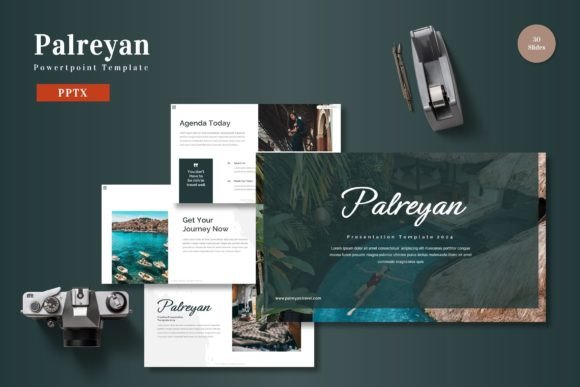
Palreyan – Powerpoint Template takes a different approach. It is built around the idea that a presentation template should reduce friction, not create it. With 150 total slides spread across five premade color schemes and five complete PPTX files, this template is designed to move with your process rather than force you to adapt to it.
What Palreyan – Powerpoint Template Actually Provides
At its core, this template gives you a structured yet flexible foundation for creating presentations that combine data, graphics, and narrative content without the usual design headaches. Each of the five color variations contains 30 slides, so you are not stuck rebuilding slides from scratch when you need a different tone for a different audience.
The template includes section break slides, handcrafted infographics, master slide-based layouts, pixel-perfect illustrations, and picture placeholders that support drag-and-drop image insertion. Every graphic is resizable and editable, which means you are not locked into fixed artwork that clashes with your brand. There are also dedicated gallery and portfolio slides, making it suitable for both data-heavy business decks and visual showcases.
Where Palreyan Fits in a Real Presentation Workflow
Most people approach presentation design in phases. You start with outlining your message, move into structuring the narrative, then build slides, refine visuals, and finally rehearse and deliver. Palreyan is most useful during the slide-building and visual refinement phases, but its structure also influences how you plan your content.
Before You Open PowerPoint: Planning with the Template in Mind
Before you create a single slide, you can review the available layouts and color schemes in the template folder. The Readme First file and font information help you prepare the right assets ahead of time. Knowing that you have 30 slides per color scheme and specific section break slides lets you plan your presentation structure in advance.
If you know you need six sections with four to five slides each, Palreyan’s built-in section breaks give you natural pause points. If you already have brand colors, you can preview which of the five color variations aligns best with your existing materials. This upfront preparation saves time because you are not hunting for the right layout while your audience waits.
The template also includes infographic-based layouts, so if your presentation relies on data visualization, you can plan which metrics to highlight before you start dragging elements around.
During Slide Creation: Working with the Template’s Strengths
When you open one of the five included PPTX files, you immediately see how the master slides work. The template is built on master slides, which means global changes to fonts, colors, or spacing apply consistently across all slides. This is one of the most overlooked efficiency features in PowerPoint. If you decide mid-project that your headings should be a different shade, you change it once on the master slide, and every slide updates automatically.
The drag-and-drop picture placeholders are another practical feature. Instead of cropping and resizing every image manually, you simply drag your photo into the placeholder frame. The template handles the scaling and positioning. This is especially useful when you are working with a team and multiple people are contributing images of varying sizes and orientations.
All graphics in the template are resizable and editable. If an illustration is too large or too small for your content, you can scale it without losing quality. If a graphic’s color needs to shift to match your brand, you can recolor it directly in PowerPoint. This level of control matters when you are presenting to clients or stakeholders who expect visual consistency.
The gallery and portfolio slides give you ready-made layouts for showcasing work samples, team photos, product images, or case study visuals. These slides are designed to hold multiple images in a clean grid, which saves you from manually aligning boxes and margins.
After the Slides Are Built: Refining and Delivering
Once your slides are assembled, Palreyan’s color consistency becomes a quality control advantage. Because the template uses a unified color scheme across all 30 slides in each file, you do not have to double-check that every slide matches. The section break slides also help during delivery. When you transition between major topics, a clear visual break signals to your audience that you are moving to a new idea. This improves pacing and comprehension, especially in longer presentations.
If you are presenting to multiple audiences or using the same core content for different contexts, the five color variations let you adapt without rebuilding. For example, you might use the dark color scheme for a formal boardroom presentation and a lighter scheme for a creative pitch to a design team. Both come from the same template, so the layout structure remains consistent.
For Marketers and Sales Professionals
If you regularly present campaign results, market research, or sales forecasts, the handcrafted infographics are a direct fit. Use the data visualization slides to turn raw numbers into readable charts and comparisons. The template’s section break slides are useful for dividing your deck into executive summary, methodology, results, and next steps. Keep your call-to-action slides consistent by using the same layout across different presentations.
For Educators and Trainers
When teaching complex topics, visual consistency helps learners focus on content rather than design noise. Palreyan’s master slides let you set a consistent heading style, body text size, and accent color across an entire course module. The portfolio slides can be repurposed for case studies, student work examples, or before-and-after comparisons. The drag-and-drop image placeholders save time when you are preparing multiple lessons in a short period.
For Freelancers and Small Business Owners
If you create proposals, pitch decks, or client updates on a regular basis, having a template that works out of the box reduces the time between idea and delivery. The five included PPTX files give you five distinct presentation identities without requiring design skills. Choose a color variation that matches your brand, swap in your logo, and you have a professional deck that does not look like a template.
For Entrepreneurs and Founders
When you are pitching to investors or partners, your presentation needs to feel polished without looking overdesigned. Palreyan balances visual impact with readability. The infographic slides let you present traction metrics or financial projections clearly. The section break slides give your deck a structured flow that guides the viewer through your story. Because the template is built on master slides, you can make last-minute updates without breaking the layout.
For Creative Professionals and Designers
Even if you are comfortable designing from scratch, Palreyan can serve as a starting point that accelerates your workflow. The resizable illustrations and editable graphics give you a foundation you can customize further. The gallery slides work well for portfolio reviews, case study presentations, or creative pitch decks. You can override the color scheme or tweak individual elements without fighting the template’s structure.
How Palreyan Interacts with Other Tools and Assets
The template is designed to work within the standard PowerPoint ecosystem. Since it uses no external dependencies or proprietary plugins, you can open it in PowerPoint for Windows, Mac, or PowerPoint Online. The included font information and readme file help you prepare the correct typefaces ahead of time, which avoids font substitution issues when moving between devices.
If you use a digital asset management system or a brand folder, you can store the five PPTX files alongside your logos, approved images, and brand guidelines. When you need to create a new presentation, you pull the relevant color variant, drag in your assets, and adjust the text. This keeps your workflow lean and reduces the temptation to start from a blank slide.
The template also works well with presentation delivery tools like PowerPoint Speaker Coach, Zoom screen sharing, or projector setups. Because the slides are built at standard widescreen resolution, they display cleanly across most screens without cropping or distortion.
Quality Control and Long-Term Use
One of the less obvious benefits of Palreyan is that it enforces a baseline quality standard. When every slide uses consistent margins, typography, and color, your presentation looks cohesive even if you are not a designer. Over time, this consistency builds trust with your audience. They learn to expect a certain level of clarity and polish from your materials.
For organizations that produce presentations frequently, having a template with 150 total slides across five color schemes means you can maintain a consistent visual identity without repeating the same layouts. The variety keeps your presentations fresh while the underlying structure ensures they still feel like they belong to the same brand.
The template also includes a folder with font and photo information. This is a small detail, but it matters when you are collaborating with a team. Everyone knows which fonts to install and where the placeholder images go. The note about preview images not being included in the download is clearly stated, so you know exactly what you are getting and what you need to supply yourself.
A Few Observations on Getting the Most Out of the Template
Do not try to use all 30 slides in a single presentation. Pick the layouts that serve your narrative and delete the rest. The real value of having 30 slides per color scheme is that you have options, not that you have to use them all.
Take advantage of the master slides early. Before you start editing individual slides, set your brand fonts and colors on the master. This one step will save you hours of manual adjustments later.
Use the section break slides intentionally. Each time you move to a new major topic, the visual pause resets the viewer’s attention. It is a simple technique that improves how your audience follows your argument.
If you are presenting data, prioritize the handcrafted infographics over plain text slides. The infographics are designed to present information in a way that is both readable and visually engaging. They transform what could be a dry table of numbers into a clear story point.
Finally, treat the template as a starting point, not a cage. You can resize, recolor, and rearrange any element. If a layout does not quite fit your content, modify it. The template is built to support that kind of flexibility.
Conclusion
Palreyan – Powerpoint Template is not a magic solution that writes your presentation for you. What it does is remove the design friction that slows down the slide-building process. With 150 slides across five color variations, master slide integration, editable graphics, and drag-and-drop placeholders, it gives you a practical foundation that fits into real workflows. Whether you are preparing a sales pitch, a training module, a portfolio review, or a boardroom update, this template lets you focus on your message instead of fighting your tools.