Understanding the Nucalos Keynote Template: A Practical Guide for Presentation Design
When preparing a presentation, the balance between visual impact and practical workflow can be difficult to strike. Many templates promise polish but deliver rigidity, leaving you to wrestle with layouts that resist customization. The Nucalos Keynote Template aims to address this tension by offering a substantial foundation of slides while preserving flexibility. This article explores what makes this template distinct, how it compares with other approaches to presentation design, and the factors to consider when deciding whether it fits your project.
What the Nucalos Keynote Template Offers
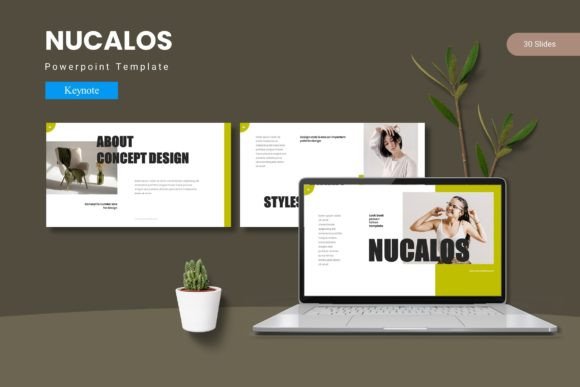
At its core, the Nucalos Keynote Template is a slide system built around breadth and consistency. It includes 150 total slides distributed across five premade color variations, with 30 slides allocated to each template set. This structure means you are not starting from a single master layout but from a curated collection that already includes section breaks, infographics, gallery pages, and portfolio slides. The presence of handcrafted infographics and pixel-perfect illustrations indicates attention to visual detail, while the reliance on master slides suggests that changes made at the template level will propagate consistently throughout your presentation.
The template also emphasizes ease of use through picture placeholders with drag-and-drop functionality. Instead of cropping and resizing images manually, you can replace placeholder visuals directly, which speeds up assembly. All graphic elements are resizable and editable, so you are not locked into predetermined sizes or positions. This combination of prebuilt variety and editable structure is one of the template's central selling points.
Comparing Nucalos with Alternative Approaches
To evaluate whether the Nucalos Keynote Template is right for you, it helps to consider the broader landscape of presentation design options. Broadly, choices fall into three categories: fully custom design, minimal templates, and feature-rich templates like Nucalos.
Fully Custom Design
Hiring a designer or building every slide from scratch offers maximum control. You can align every element with your brand guidelines, incorporate unique visual metaphors, and address niche content requirements. However, this approach is time-intensive and expensive. For a single presentation, the investment may be hard to justify. The Nucalos template, by contrast, provides a ready-made visual language that reduces the need for custom design while still allowing edits. If your brand requires very specific typography, color psychology, or unconventional layouts, a fully custom route might be necessary. If you need a professional look without starting from zero, Nucalos offers a middle ground.
Minimal or Basic Templates
Many Keynote templates offer fewer slides, often between 10 and 30, with limited color options and simple text placeholders. These can be adequate for internal updates or short presentations where visual complexity is unnecessary. The tradeoff is that you may spend extra time creating additional slides, sourcing icons, and ensuring consistency across sections. The Nucalos template, with its 150 slides and five color schemes, is designed to reduce that supplementary work. If your presentation requires multiple sections, portfolio pages, or infographic elements, a minimal template may leave you hunting for assets. In that scenario, a more comprehensive template saves time.
Feature-Rich Templates Like Nucalos
Templates that bundle dozens of slides, multiple color schemes, and specialized page types (such as section breaks and portfolio layouts) are best suited for presentations where visual variety matters. The Nucalos Keynote Template fits this category. Its five color variations allow you to choose a palette that aligns with your topic or brand, and the inclusion of handcrafted infographics means you do not need to design data visuals from scratch. The master-slide architecture ensures that font and color changes apply across the deck, which is a significant convenience when you need to adjust the overall look late in the process.
One limitation of such templates is that the predefined color schemes may not match your exact brand colors. While the template allows customization, achieving a precise match may require adjusting multiple elements. Additionally, the breadth of 150 slides can feel overwhelming if you only need a compact presentation. In those cases, a smaller template might be more efficient.
Strengths
- Volume and variety: With 150 slides and five color schemes, the template covers many presentation scenarios, from pitch decks to portfolio reviews. You are likely to find layouts that fit your content without building extras.
- Editable assets: All graphic elements, including illustrations and infographics, are resizable and editable. This means you can adapt visuals to your message rather than forcing your message into fixed visuals.
- Drag-and-drop images: Picture placeholders simplify image integration, which is especially useful if you work with many photos, product shots, or team headshots.
- Master-slide efficiency: Changes made to master slides apply across the deck, ensuring consistency in fonts, colors, and spacing. This is a practical advantage when collaborating or iterating.
Tradeoffs
- Color scheme limitations: The five premade colors are carefully chosen, but they may not match every brand palette. Customizing colors further is possible but requires some manual adjustment, especially if you need multiple accent colors.
- Learning curve for master slides: While master slides are powerful, users unfamiliar with Keynote's master-slide system may need time to understand how to edit them without breaking the template's consistency.
- Potential overkill: For a short internal memo or a one-off update, 150 slides can feel excessive. Navigating a large template library to find the right layout may slow you down if you only need a handful of slides.
- File size: Templates with many graphics, illustrations, and high-resolution placeholders can result in larger Keynote files, which may affect performance on older devices or when sharing via email.
When the Nucalos Keynote Template Is a Strong Fit
The Nucalos template is well suited for presentations where visual consistency matters across a substantial number of slides. Examples include:
- Client pitches and proposals: You need to present a polished, cohesive narrative that reflects professionalism. The template's section breaks and portfolio slides help structure your story clearly.
- Portfolio reviews or showcase decks: The built-in gallery and portfolio slide types allow you to display work samples without designing individual layouts. Drag-and-drop image placeholders streamline the process.
- Internal training or onboarding materials: If you need to produce a multi-section deck with infographics, the template reduces the effort of creating data visuals from scratch.
- Conference or event presentations: When presenting to a large audience, visual variety keeps engagement high. The multiple color schemes also help you adapt to event branding.
In these contexts, the template's breadth becomes an asset rather than a burden. You can focus on content while relying on the template's structure for visual coherence.
When You Might Need a Different Option
There are scenarios where the Nucalos Keynote Template may not be the ideal choice:
- Strict brand compliance: If your organization requires exact hex codes, specific typefaces not included in the template, or highly constrained layouts, you may need a custom solution or a template built specifically for your brand.
- Minimalist presentations: If your style favors clean, low-graphic slides with ample white space, a template with 150 slides and many infographics may feel busy. In that case, a simpler template with fewer elements could be more appropriate.
- Live collaboration in Keynote: While the template works within Keynote, teams collaborating in real time may find that extensive master-slide structures introduce complexity when merging changes. A simpler deck structure can reduce friction.
- Budget considerations: Premium templates with many slides typically cost more than basic ones. If your presentation needs are occasional and small-scale, investing in a comprehensive template may not be cost-effective.
Practical Decision Factors
When evaluating the Nucalos Keynote Template, consider the following:
- Slide count needs: Estimate how many slides your presentation requires. If you need 20 or fewer, a smaller template may suffice. If you regularly build decks with 40 or more slides, the volume here becomes valuable.
- Color flexibility: Assess whether one of the five premade schemes closely matches your brand or topic. If you need a highly specific palette, factor in the time to customize colors.
- Image usage: If your presentation relies heavily on photos or portfolio visuals, the drag-and-drop placeholders will save significant time. If your content is mostly text or data, you may not use this feature as much.
- Team skill level: If your colleagues are comfortable with Keynote's master slides, the template will be easy to adopt. If not, you may need to provide guidance or limit edits to specific slides.
Final Considerations
The Nucalos Keynote Template represents a thoughtful middle ground between a fully custom presentation and a basic slide deck. Its 150 slides, five color variations, and handcrafted infographics offer a robust starting point for presentations that require visual variety and professional polish. The reliance on master slides and editable assets means you retain control without sacrificing consistency. At the same time, it is not a one-size-fits-all solution. For projects with tight brand constraints, minimalist design preferences, or very limited slide counts, alternative approaches may serve you better.
By understanding the template's strengths and tradeoffs, you can make an informed decision that aligns with your content, audience, and workflow. Whether you are pitching a client, showcasing a portfolio, or preparing a conference talk, the right template is one that supports your message without getting in the way. The Nucalos Keynote Template achieves that balance for many presentation scenarios, especially when variety and efficiency are both priorities.