Bundle Email Signature Template: Your Brand's Digital Handshake
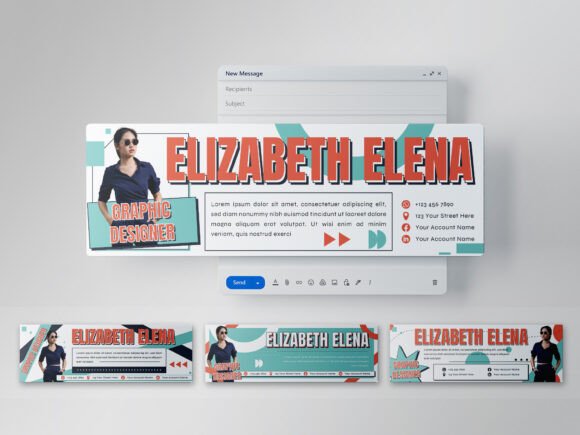
Every email you send carries more than your message. It carries your reputation. The Bundle Email Signature Template offers a practical way to turn that small space at the bottom of your emails into a consistent branding tool. Designed for multipurpose use, this collection includes four distinct Illustrator-based layouts that work across industries—from marketing agencies to educational platforms.
Professionals often overlook email signatures, yet each one is a touchpoint that reinforces credibility. The Bundle Creative Email Signature gives you a structured format that keeps your contact details, logo, and call-to-action organized without distracting from your message. It is a design asset that serves function first, with appearance following naturally.
What Makes the Bundle Email Signature Template Stand Out
The visual personality of this template set leans toward clean, modern professionalism. Each of the four design styles follows a 600x200 pixel canvas with 72 DPI resolution, a format that displays well on most screens without feeling bulky or distracting. The fully layered AI and EPS files allow you to customize every element without starting from scratch. Whether you need to swap a logo, adjust contact details, or match brand colors, the RGB color support makes the process straightforward.
The templates use free fonts, which means you do not need to purchase additional typefaces to get started. This lowers the barrier for small business owners and independent creators who want a polished signature without ongoing font licensing costs. The Illustrator-based structure also means anyone familiar with vector editing can reshape the layout to fit their exact needs.
Each of the four styles carries a slightly different personality. One may lean minimal with clean lines and generous whitespace, while another includes subtle graphic accents that draw the eye to key information. This variety lets you choose a look that aligns with your brand identity without forcing a single design on every use case.
Where This Template Shines Across Industries
Email signatures often get treated as an afterthought, yet they appear in every message you send. The Bundle Creative Email Signature is well suited for professionals who send high volumes of email and want that repetition to reinforce their brand identity.
- Digital marketing agencies benefit from having a signature that mirrors their website or social media style. When clients receive emails from multiple team members, a unified signature creates a sense of cohesion.
- Webinar hosts and educators can use the template to include links to upcoming sessions, resources, or registration pages without cluttering the design.
- E-commerce businesses and product sellers can use the signature to feature current promotions or new arrivals in a compact space.
- Content creators and publishers often need to direct readers to their latest articles or channels, and a well-structured signature does that without feeling pushy.
The 600x200 size is small enough to avoid dominating the email body but large enough to hold meaningful information. It works across webmail clients, desktop applications, and mobile devices when the spacing is managed correctly.
How a Well-Designed Signature Influences Brand Perception
When someone reads your email, the signature is the last thing they see. If it looks thrown together, it can undermine the professionalism of everything above it. The Bundle Email Signature Template addresses this by providing a structured layout that maintains visual hierarchy. Recipients can quickly locate your contact information without scanning through unrelated graphics.
Consistency across your team's emails builds recognition over time. When every message carries the same signature style, your brand becomes more memorable. This is especially valuable for service-based businesses where trust and familiarity play a large role in client decisions. A recognizable signature acts like a closing logo in a video—it signals the end of the message and leaves a lasting impression.
Readability is another factor. The 72 DPI resolution is optimized for on-screen viewing, which means text remains clear even on lower-resolution monitors. The free fonts included in the design are selected for legibility at small sizes, which is critical given the limited real estate of a signature block. When text is crisp and spacing is balanced, the recipient spends less effort parsing your details and more time acting on them.
Practical Guidance for Choosing and Using the Signature
Before selecting which of the four styles to use, consider your typical email volume and audience. If you send formal proposals and client contracts, a minimalist layout with clean lines will serve you better. For newsletters or promotional emails, a style with subtle graphic accents can draw attention to your call-to-action without overwhelming the content.
Testing font pairings is straightforward with the layered AI files. You can preview different combinations without affecting the original design. Stick to no more than two font families in your signature—one for your name and one for the supporting details. This keeps the hierarchy clear and avoids the cluttered look that hurts readability.
When customizing, pay attention to spacing. The 600 pixel width gives you room to align elements horizontally, but avoid crowding the edges. Leave enough white space around your logo and text so the signature breathes on mobile screens, where the available width is smaller. The RGB color space ensures that your brand colors display consistently across monitors, which is important when your team uses different devices.
Commercial licensing is included with the template, so you can use it for client work, internal branding, or commercial marketing materials without additional fees. If you plan to distribute the modified signature files to others, check the license terms for redistribution rights. For most in-house and client projects, the standard license covers your needs.
If you have questions about customization or licensing, contacting the designer directly is the most efficient way to get clarity. The product page typically includes support contact information, and most designers respond within a business day.
Real-World Examples and Observations
Consider a marketing agency managing five client accounts. Each team member can use the same signature template with client-specific colors and logos. This creates a branded experience for every email while keeping the internal production time low. The layered EPS file allows the agency designer to batch-produce signatures for the entire team in under an hour.
For a solo entrepreneur running an online course platform, the signature becomes a consistent touchpoint across automated emails, direct replies, and community communications. Adding a link to the next webinar or a free resource guide fits naturally within the 600x200 space. The recipient sees the same polished design every time, which reinforces the credibility of the course brand.
Publishers and bloggers often rotate their featured content weekly. With the editable AI file, updating the link or graphic in the signature takes seconds. This flexibility makes the template more practical than a static image-based signature that requires full redesigns for small updates. It also allows you to test different calls-to-action without committing to a permanent change.
Making the Template Work for Your Specific Needs
The Bundle Email Signature Template and Bundle Creative Email Signature are design assets that prioritize function without sacrificing appearance. They fill a gap that many professionals overlook—the daily repetition of email communication. A thoughtful signature reinforces your brand identity, improves recognition, and saves recipients time when they need your contact details.
The four included styles give you room to choose a look that matches your brand personality, whether that is understated and minimal or slightly more graphic. The layered files make customization accessible to anyone with basic vector editing skills, and the free font selection removes a common barrier to entry.
If you have been using a plain text signature or a poorly scaled image, this template offers a clear upgrade path. Start by selecting the style that best fits your industry, customize the colors and details, and test how it renders across email clients. Small adjustments to spacing and font pairing will make the final result feel intentional rather than generic.
The investment in a proper email signature pays back every time you hit send. It is one of the few design elements that appears in every outbound message, making it a high-leverage asset for brand consistency and professional credibility. If you have questions about which style fits your project, reach out to the designer—they can often point you toward the layout that will serve your specific audience best.