Design Smarter With a Fitness Tracking App Mobile UI Kit
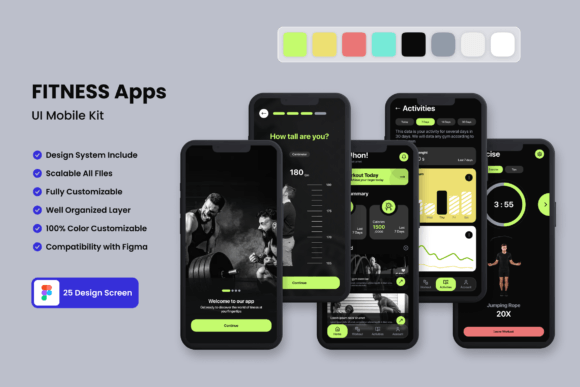
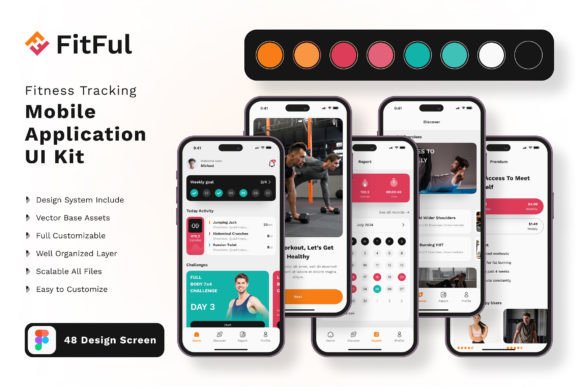
Every pixel you see on screen was crafted with intention, and the Fitness Tracking App Mobile UI KIT proves just how far thoughtful design can take your project. Whether you are building a wellness companion from scratch or refreshing an existing concept, this collection of 20 high-fidelity templates gives you a head start that saves hours of wireframing and prototyping. Because in modern graphic design, speed should never come at the cost of quality — and here, every screen delivers both.
What makes this set stand out is not just the number of templates, but the depth of the visual assets packed inside. You get 80 UI elements, 100 scalable vector layers, and a free font that works seamlessly with your brand system. Each screen is built at pixel perfection, meaning you can drop them into your workflow without spending extra time on alignment or spacing. For designers working across platforms, the kit is fully compatible with Adobe Photoshop, Adobe InDesign, Adobe XD, and Sketch — so your preferred tools are already covered.
Why This Kit Elevates Your Visual Design Workflow
Consistency is the backbone of strong brand identity, and this UI kit enforces it automatically. With symbol objects and fully layered files, you can maintain visual hierarchy across every screen without duplicating effort. Need to adjust a color palette for a new campaign? Simply edit the shared styles, and the change ripples through all 20 templates. This kind of efficiency matters when you are juggling multiple projects, from web design to social media graphics, because it frees up mental space for the creative decisions that truly shape user experience.
The kit also includes 100 vector icons that are easy to recolor and resize without distortion. That means you can adapt the visual language for different brand voices — whether you are aiming for a bold, energetic fitness app or a calm, minimalist wellness tracker. The typography and spacing are already optimized for readability on mobile, so you avoid common pitfalls like cramped buttons or illegible labels. And because all images used in previews are excluded, you will work only with the clean, editable assets that matter.
Practical Applications Across Design Disciplines
- Branding and logo design – Use the consistent icon style and color system to extend your brand identity into the product interface.
- Marketing materials – Pull screens directly into landing pages or ad mockups to show realistic user journeys.
- Social media content – Generate on-brand previews for app launches, feature announcements, or user testimonials.
- Website and UI design – Integrate the templates into broader web prototypes for a cohesive digital ecosystem.
- Editorial layouts – Incorporate UI elements into case studies or design portfolios to demonstrate process and polish.
The kit also supports more specialized workflows. In editorial design, you can use the clean layout grids as inspiration for print spreads. For packaging design, the consistent visual hierarchy helps you think about how digital and physical brand touchpoints align. Even in advertising campaigns, the screen templates give art directors a realistic canvas to showcase user engagement without building every element from scratch.
How to Get the Most Out of These Creative Assets
Start by mapping your project’s core user flows against the 20 available screens. Identify which templates match your primary features — onboarding, dashboard, activity metrics, goal setting, and social sharing are all covered. Then, customize the color palette to match your existing brand guidelines. Because the files are fully layered, you can lock backgrounds while adjusting foreground elements, or vice versa. This modular approach keeps your design workflow fast but precise.
Pay attention to visual hierarchy as you adapt each screen. The kit’s pre-built typography scales and spacing ratios are designed for mobile readability, so resist the urge to overload any template with extra elements. Instead, subtract where possible. The true power of a UI kit lies in its restraint: by starting with a clean, proven structure, you avoid design debt and deliver a polished user experience faster. And if you need to extend beyond the included screens, the symbol objects and vector layers make it simple to replicate the same visual logic across new pages.
Typography, Color, and Composition in Practice
The bundled free font is chosen for clarity at mobile sizes, with generous x-height and open counters that prevent fatigue during long reading sessions. When you swap in your own typeface, test it at the same sizes — typically 14 to 18 px for body text — to ensure legibility remains high. For the color palette, take advantage of the easy-to-change color styles to run quick A/B tests on contrast ratios. A fitness app often lives in high-glare environments like gyms or outdoor runs, so maintaining strong contrast between backgrounds and data points is critical for usability.
Compositionally, each template follows established mobile UI patterns: thumb-friendly tap targets, clear action buttons, and logical content groupings. This means your design decisions are built on proven UX research, not guesswork. By layering your own brand’s photography, illustrations, and copy into these structures, you preserve modern aesthetics while injecting unique personality. The result is a professional presentation that resonates with users and stakeholders alike.
Closing Thoughts on Design Efficiency and Brand Impact
Thoughtful design is never an accident — it comes from having the right tools and knowing how to use them. This Fitness Tracking App Mobile UI KIT gives you a head start that respects your creative process, not bypasses it. Whether you are a freelance designer building a client’s MVP, or an in-house team iterating on a wellness product, the balance of structure and flexibility here lets you focus on what truly matters: clear communication, cohesive branding, and a user experience that feels intuitive from the first tap. Great design starts with great foundations, and this kit lays one that is ready for anything.