The Smart Professional’s Guide to a 2 in 1 Portfolio Website Design
You know that feeling when you land on a professional’s website and it just feels… incomplete? Maybe the work is solid, but the presentation doesn’t quite match the caliber of the projects. Or maybe the layout is so rigid that every project ends up looking the same, regardless of whether it was a code-heavy backend rebuild or a whimsical brand identity for a bakery. The modern professional space is crowded, and how you present your work matters just as much as the work itself. That’s where the concept of a 2 in 1 portfolio website design enters the conversation. It moves past the cookie-cutter template approach and gives you the breathing room to show different facets of what you do without confusing your audience.
Why One Layout Often Falls Short for Today’s Professionals
The classic single-page or single-layout portfolio works fine if your work is extremely linear. But how many of us really fit into that box anymore? A lot of designers write. A lot of developers do UX work. A lot of photographers run creative agencies. When you try to force a diverse skill set into a single layout, something inevitably gets watered down. Either the technical deep-dives look cluttered, or the visual galleries feel cramped.
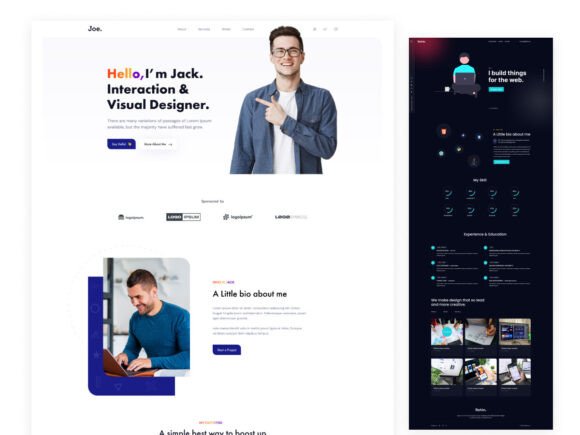
A 2 in 1 portfolio website design solves this by providing two distinct yet visually cohesive environments for your work. Think of it less as two separate websites and more as a dual-purpose identity system. One layout might lean heavily into visual storytelling—large images, spacious grids, minimal text. The other might prioritize case studies, timelines, and data visualization. This isn’t about having too many choices; it’s about having the right container for each piece of your professional narrative. The Jeo Portfolio Template is built specifically around this need, recognizing that a developer’s deep-dive project page serves a completely different purpose than a designer’s mood-driven portfolio landing page.
Real-World Scenarios: Seeing the 2 in 1 Concept in Action
Abstract concepts are fine, but let’s talk about specific situations where having this dual approach genuinely changes the game. It’s not just a nice feature; it often becomes a practical necessity depending on your industry and audience.
The Hybrid Freelancer
Imagine you’re a freelancer who builds web applications and also handles the interface design. Your clients hire you for both. When you send them a link to your portfolio, they need to see two things: your eye for aesthetics and your ability to architect a solution. With a traditional single layout, you often have to choose one focus. With a 2 in 1 portfolio website design, you can dedicate your primary layout to polished, visual case studies showing the final product and user flows. The secondary layout or project page can then dive into the technical stack, the code snippets, and the backend logic. The client sees a complete picture without the cognitive load of navigating a confusing site structure. The Jeo template’s “two comprehensive project pages” cater directly to this split, giving you room to both show and tell effectively.
The Marketing Manager with a Creative Side
Marketing professionals often juggle two distinct types of content. On one hand, you need to showcase campaign results—graphs, KPIs, before-and-after metrics. On the other, you want to display the creative assets themselves: the video scripts, the ad designs, the landing page copy. These require different visual treatments. A results page benefits from clear layouts, bold numbers, and comparative data. A creative portfolio benefits from immersive visuals and storytelling. A multi-layout approach allows you to speak the language of data-driven stakeholders in one section and the language of creative directors in another. This builds trust because it shows you understand the full scope of the role, not just one aspect of it.
The Visual Artist or Photographer
Photographers and visual artists often struggle with portfolio templates that are either too minimal or too cluttered. A 2 in 1 portfolio website design offers a smart workaround. You can use the first layout as a pristine gallery—full-bleed images, minimal text, a true visual experience. The second layout can serve as a studio journal, a client list, or a behind-the-scenes look at your creative process. This adds depth to your brand. It tells the client not just what you can produce, but who you are and how you think. The well-organized layers and groups found in a template like Jeo make it easy to maintain this dual identity without hours of manual setup.
The Design Agency Needing Client Versatility
Even small agencies benefit from this approach. A single portfolio template that tries to fit a rebranding project for a luxury hotel and a SaaS dashboard redesign will inevitably feel disjointed. With a built-in dual layout strategy, you can present each project in its best light. The clean, simple style of one layout might be perfect for the luxury brand, while a more structured, data-friendly layout works for the tech product. The consistency comes from the underlying system—shared fonts, colors, and global symbols—even if the layouts function differently.
What Makes a Multi-Layout Portfolio Actually Work
It’s easy to look at a template and see just the aesthetics. But the real value of a well-structured 2 in 1 portfolio website design lies in its architecture. When you are working with a tool like the Jeo Portfolio Template from Devix, you’re not just getting a pretty skin. You are getting a system designed for rapid customization and real-world usage. The trend-forward colors and gradients are nice, but the true strength is the organization.
Having well-organized layers and groups means you can strip down the provided layouts and rebuild them with your own brand assets without tearing your hair out. The use of fully customizable and resizable symbols means updating a global element (like a header or button style) instantly updates both of your layouts. This is critical for maintaining a professional look without doubling your workload. Additionally, because the design meets WCAG 2.0 requirements and has been tested in a color blindness simulator, you can confidently share your portfolio across a wider audience, including enterprise clients who require accessibility compliance. It’s a small detail that signals a high level of professionalism.
Common Considerations Before Choosing a Dual-Layout System
As practical as a 2 in 1 portfolio website design sounds, it’s not a one-size-fits-all solution. It’s worth taking a moment to assess your specific situation before committing to a template like Jeo. One of the first things to ask yourself is whether your content genuinely supports two distinct layouts. If your work is highly uniform—say you are a copywriter who primarily produces blog posts and white papers—a single, well-optimized layout might serve you better. Adding a second layout just for the sake of it can feel forced and might confuse visitors.
Another practical consideration is maintenance. Yes, templates make customization easier, but managing two layouts still means double the content updates. If you are a solopreneur with limited time, you need to weigh the benefit of depth against the cost of upkeep. However, if you are someone who presents to different types of clients or wears multiple hats professionally, the investment in a dual-layout system pays for itself in first impressions. It signals that you are adaptable and that you understand the nuances of presentation—a quality clients actively look for.
How Different Industries Benefit from Distinct Project Pages
The beauty of a flexible template is how it adapts to different professional languages. For developers and programmers, the “two comprehensive project pages” in a 2 in 1 portfolio website design allow for a technical deep dive in one and a user-facing walkthrough in the other. For educators or consultants, one page can serve as a resource hub while the other acts as a credentials and testimonials showcase. The clean and simple style of the underlying design means that no matter how much information you put on a page, it remains readable and professional. The use of free Google Fonts also ensures that your typography looks crisp on any device, which is essential since most portfolio browsing happens on mobile first these days.
Strengths That Make a Lasting Impact
One of the strongest arguments for a 2 in 1 portfolio website design is its ability to future-proof your professional brand. As your career grows, your skills will likely diversify. A rigid template can hold you back, forcing you to omit projects that don't fit the mold. A flexible, dual-layout template grows with you. It gives you the space to experiment with new types of content without breaking your overall design system. The pixel-perfect design of a template like Jeo means that every element is placed with intention, giving you a solid foundation that you can trust. This allows you to focus on what truly matters: refining your projects, writing compelling case studies, and connecting with the right opportunities.
Ultimately, choosing a portfolio template is a deeply personal decision. It’s about finding the right balance between structure and flexibility, between aesthetics and function. The 2 in 1 portfolio website design approach, exemplified by the Jeo Portfolio Template, offers a compelling middle ground for professionals who refuse to be put into a single box. It respects the complexity of modern work and gives you the tools to present that complexity in a way that is both beautiful and understandable. Whether you are a developer showing code, a designer showing visuals, or a manager showing results, having the right layout for the right story makes all the difference.