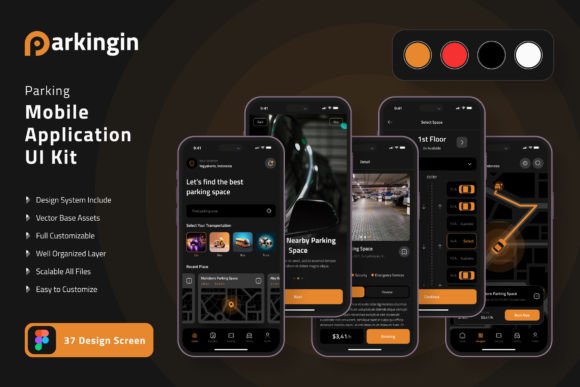
Parking App Mobile UI KIT: Build Your Parking Application With 20 High-Quality Templates
Designing a mobile application from scratch can feel like an overwhelming undertaking, especially when you are aiming for a polished, professional look that resonates with users. Whether you are a solo entrepreneur, a seasoned developer, or a creative agency owner, the need for a streamlined, consistent, and visually appealing interface is non-negotiable. The Parking App Mobile UI KIT steps into this space as a comprehensive collection of 20 high-quality templates purpose-built for constructing parking-related mobile applications. Instead of starting with a blank canvas, this kit hands you a structured, editable foundation that accelerates the design process and helps you focus on the user experience that matters most.
This article takes an in-depth look at what the Parking App Mobile UI KIT offers, explores who benefits most from its use, and provides practical guidance on how to evaluate whether it is the right fit for your next project. We will examine its core features, real-world applications, and the considerations you should keep in mind when working with pre-designed templates.
What Exactly Is the Parking App Mobile UI KIT?
At its core, the Parking App Mobile UI KIT is a curated set of interface templates designed to help you build a mobile app for parking management, booking, or navigation. The kit comprises 20 pixel-perfect screen designs that cover a wide range of common app screens, from home dashboards and search results to payment confirmations and user profiles. Unlike a generic UI set, this kit is laser-focused on the parking niche, meaning every element—from parking spot selection to time extension controls—has been thought through with real-world usage in mind.
Each template is fully layered and editable, giving you complete control over colours, typography, and layout. The kit includes 80 UI elements and 100 vector layers, all organised logically so you can quickly locate and modify components. Whether you prefer working in Adobe Photoshop, Adobe InDesign, or Sketch, the files are compatible, and the design system is built on symbol objects, making global changes effortless. The included free fonts and free icon vectors further reduce the need to source external assets, allowing you to maintain a cohesive visual language throughout your app.
One important note: the images used in previews are for demonstration purposes only and are not included in the download files. The kit itself focuses on the UI components and templates, so you will need to supply your own photography or illustrative content when customising your final product.
Key Features That Set This UI Kit Apart
When evaluating a UI kit, it helps to look at the specifics that contribute to its practicality and value. The Parking App Mobile UI KIT brings several standout characteristics to the table:
Pixel Perfect Screen Designs
Each of the 20 screens has been crafted with attention to alignment, spacing, and visual consistency. This precision means you spend less time tweaking margins and more time refining the overall flow of your application. The designs are ready to be dropped into your project with minimal adjustment.
80 UI Elements at Your Fingertips
From buttons and input fields to navigation bars and modals, the kit provides a robust library of reusable components. These elements are not isolated—they work together across screens, ensuring a unified look that users will appreciate. The 100 vector layers give you the flexibility to scale, recolour, or animate without losing quality.
Fully Layered and Editable
Every screen and element is organised into layers, making it straightforward to add, remove, or rearrange components. If you need to strip back a busy screen or add a new feature, you can do so without breaking the design structure. The symbol objects are particularly useful here: update one instance, and the change propagates across all related screens.
Cross-Platform Compatibility
The kit is available for Adobe XD, Adobe Photoshop, and Sketch. This broad compatibility ensures that whether you are working on a Mac or a PC, and whether you prefer vector-based or raster-based tools, you can access and edit the templates seamlessly. The 100% scalable vectors mean your designs remain crisp on any screen size, from small phones to large tablets.
Easy Color Style Customisation
Brand identity matters, and the kit makes it simple to swap out the default colour scheme for your own palette. Because the styles are centrally managed, you can update the primary, secondary, and accent colours in minutes, giving the entire app a fresh look that aligns with your brand guidelines.
Who Can Benefit From Using This UI Kit?
The Parking App Mobile UI KIT is designed for a broad audience, but certain groups will find it especially valuable:
- Independent app developers and freelancers who need to deliver a professional mobile app without spending weeks on interface design. The kit provides a head start that can reduce design time by days or even weeks.
- Startups and small business owners looking to create a parking booking or management solution on a tight budget. Instead of hiring a full-time designer, you can leverage the templates and focus your resources on backend development and marketing.
- Design agencies and creative teams handling multiple client projects. The kit serves as a flexible starting point that can be customized to different brands, speeding up the discovery and prototyping phases.
- UI/UX designers who want to experiment with parking app flows or need inspiration for specific screen layouts. The 20 screens cover a wide range of use cases, offering ideas for navigation, information display, and user interaction.
- Students and self-learners studying mobile app design. The fully layered files provide an excellent learning resource for understanding how professional app interfaces are structured and how components relate to one another.
Real-World Scenarios and Applications
To understand the practical value of the Parking App Mobile UI KIT, let us walk through a few realistic scenarios where it can shine:
Scenario 1: Launching a City‑Wide Parking Finder
Imagine you are building an app that helps drivers find available parking spots in a busy urban area. You need screens for a map view, a list of nearby lots, pricing details, and a reservation confirmation flow. The kit includes templates that cover exactly these use cases. You can start with the home screen design, add the map interface, and customise the reservation screens to include time selection and payment. The 80 UI elements give you all the buttons, toggles, and input fields you need to complete the flow without designing from scratch.
Scenario 2: Creating a Valet Parking Service App
For a valet parking application, you might need screens that show vehicle status, driver instructions, and tipping options. The kit's layered structure lets you remove elements that are not relevant (such as self-parking spot selection) and add new components like a vehicle photo upload or a driver tracking interface. The free icon vectors can be repurposed to represent valet services, car keys, and parking attendants, helping you maintain visual consistency.
Scenario 3: Building a Parking Payment Kiosk Companion
Some parking apps serve as digital payment tools for kiosk-based parking. You need screens for entering a parking zone number, choosing a duration, processing payments, and extending time remotely. The kit includes templates with input forms, numeric keypads, and confirmation messages that can be adapted for this purpose. The pixel-perfect design ensures that even small interaction details like button states and loading indicators feel polished.
Strengths and Practical Considerations
No tool is perfect for every situation, so let us take a balanced look at the Parking App Mobile UI KIT's strengths and its limitations.
What Works Well
- Speed of development. Having 20 ready-made screens means you can go from idea to prototype in a matter of hours rather than weeks. The components are already aligned, tested for consistency, and optimised for mobile layout.
- Customisation flexibility. The fully layered files and symbol objects give you granular control. You can adjust every aspect of the design, from typography to padding, without worrying about breaking the overall structure.
- Niche focus. Because the kit is specifically designed for parking apps, every screen and element serves a relevant purpose. You are not paying for hundreds of generic components that you will never use.
- Cross-tool support. Whether you are a Sketch veteran or a Photoshop loyalist, you can work in your preferred environment. This reduces the learning curve and lets you stay productive.
What to Keep in Mind
- Preview images are not included. The kit provides the UI templates, but any photography, illustrations, or branded imagery you see in the previews must be sourced separately. This is standard practice, but it is worth factoring into your timeline and budget.
- You still need design skills. While the kit simplifies the process, you will benefit from a basic understanding of your chosen design tool. Customising layers, swapping colours, and adding new screens requires some familiarity with the software.
- Limited to mobile screens. This kit focuses entirely on mobile app interfaces. If your project also requires a web dashboard or a tablet version, you may need to create those separately or look for complementary kits.
- No code included. The templates are design files, not interactive prototypes or code. You will need to hand off the designs to a developer or convert them using your preferred method if you are building a functional app.
How to Evaluate Whether This Kit Suits Your Needs
Choosing a UI kit is a practical decision. Here are a few guidelines to help you determine if the Parking App Mobile UI KIT aligns with your project goals:
- Define your screen requirements. List the key screens your app needs. Does the kit include them? The 20 templates cover a broad range, but if your app has very specific functionality, you might need to create additional screens from scratch.
- Assess your team's skill set. If you or your team are comfortable with Adobe Photoshop, Adobe XD, or Sketch, the kit will feel familiar. If you prefer other tools (like Figma or Affinity Designer), check whether the file formats can be imported successfully.
- Consider your brand identity. The kit's default colour style is neutral and modern, but you will want to customise it. Evaluate how easy it is to swap colours and update typography—thanks to the symbol objects, this is straightforward.
- Think about future scalability. If your app might grow to include additional features (such as loyalty programs, push notifications, or social sharing), you will need to extend the design system. The kit's layered structure and reusable elements make expansion manageable, but it is worth planning ahead.
Practical Guidance for Getting the Most Out of the Kit
Once you have decided to use the Parking App Mobile UI KIT, here are some actionable tips to maximise its value:
- Start with a wireframe. Use the templates as visual references, but sketch out your app's user flow on paper or in a low-fidelity tool first. This helps you identify which screens you truly need and how they connect.
- Customise the colour palette early. Set your brand colours at the beginning of the design process. Because the kit uses symbol objects, a global colour change takes minutes and ensures consistency across all screens.
- Replace placeholder content. Swap out any generic text and icons for your own copy and brand-specific visuals. This step transforms the template from a generic kit into an app that feels uniquely yours.
- Maintain consistency. Stick to the spacing and typography rules defined in the kit. If you add new screens, use the existing UI elements as building blocks to preserve the cohesive look.
- Test on real devices. Export your designs and view them on actual mobile screens. The pixel-perfect nature of the kit provides a solid foundation, but real-world testing helps you catch any sizing or readability issues.
Final Thoughts on the Parking App Mobile UI KIT
The Parking App Mobile UI KIT stands out as a focused, practical resource for anyone involved in building a parking-related mobile application. Its 20 high-quality templates, 80 UI elements, and fully layered vector files provide a strong starting point that can save significant time and effort. Whether you are a solo developer, a design agency, or a business owner looking to launch a parking solution, this kit offers a blend of flexibility, quality, and niche relevance that is hard to beat.
By understanding its features, recognising its limitations, and following the practical guidance shared here, you can confidently evaluate whether this UI kit aligns with your project. If it does, you will be well on your way to creating a mobile app that looks professional, functions smoothly, and meets the needs of your target users—all without starting from a blank screen.